The most popular advice about formatting a press release is also the least complete: follow one standard template and send it everywhere. That worked when the release was primarily a document passed between fax machines, inboxes, and newsroom desks. It doesn't account for a headline cut short in Google News, a lead compressed in a mobile social preview, or a PDF that never gets opened.
The durable principles still matter. The modern press release format traces back to Ivy Lee in 1906, after a fatal Pennsylvania Railroad accident, and its core structure remains recognizable today: headline, dateline, lead, body, quote, boilerplate, and contact details. Meltwater's history of the press release shows why that structure survived, but survival isn't the same as sufficiency.
A release now has to preserve its meaning across a newsroom CMS, an email client, a PDF reader, search results, and social feeds. The practical question isn't merely whether the document looks professional. It's whether the headline, news angle, evidence, and contact path remain understandable after formatting is stripped, text is truncated, or content is republished without its original layout.
Table of Contents
- Why the Old Press Release Format Is No Longer Enough
- The Seven Building Blocks of a Press Release
- PDF, Word, or Plain Text Choosing the Right Format to Send
- AP Style Rules Every Formatted Release Should Follow
- Formatting for Different Announcement Scenarios
- Pre-Send Checklist and Common Formatting Mistakes
- Putting the Format to Work in 2026
Why the Old Press Release Format Is No Longer Enough
The universal-template myth breaks down because a press release is no longer consumed in one environment. A traditional Word document with a logo, generous spacing, and carefully placed visual elements may look polished when opened as intended. Once pasted into a content management system, much of that styling can disappear. A social platform may flatten multiple links into a single preview, while an email client may clip the body before the journalist reaches the boilerplate.
The document still needs a clear label, headline, dateline, lead, body, boilerplate, and contact block. Rutgers' press-release basics support that standardized stack, including a short headline, inverted-pyramid body, quote, boilerplate, complete contact information, and an end marker. The difference is that each block now needs to work as plain text as well as designed content.
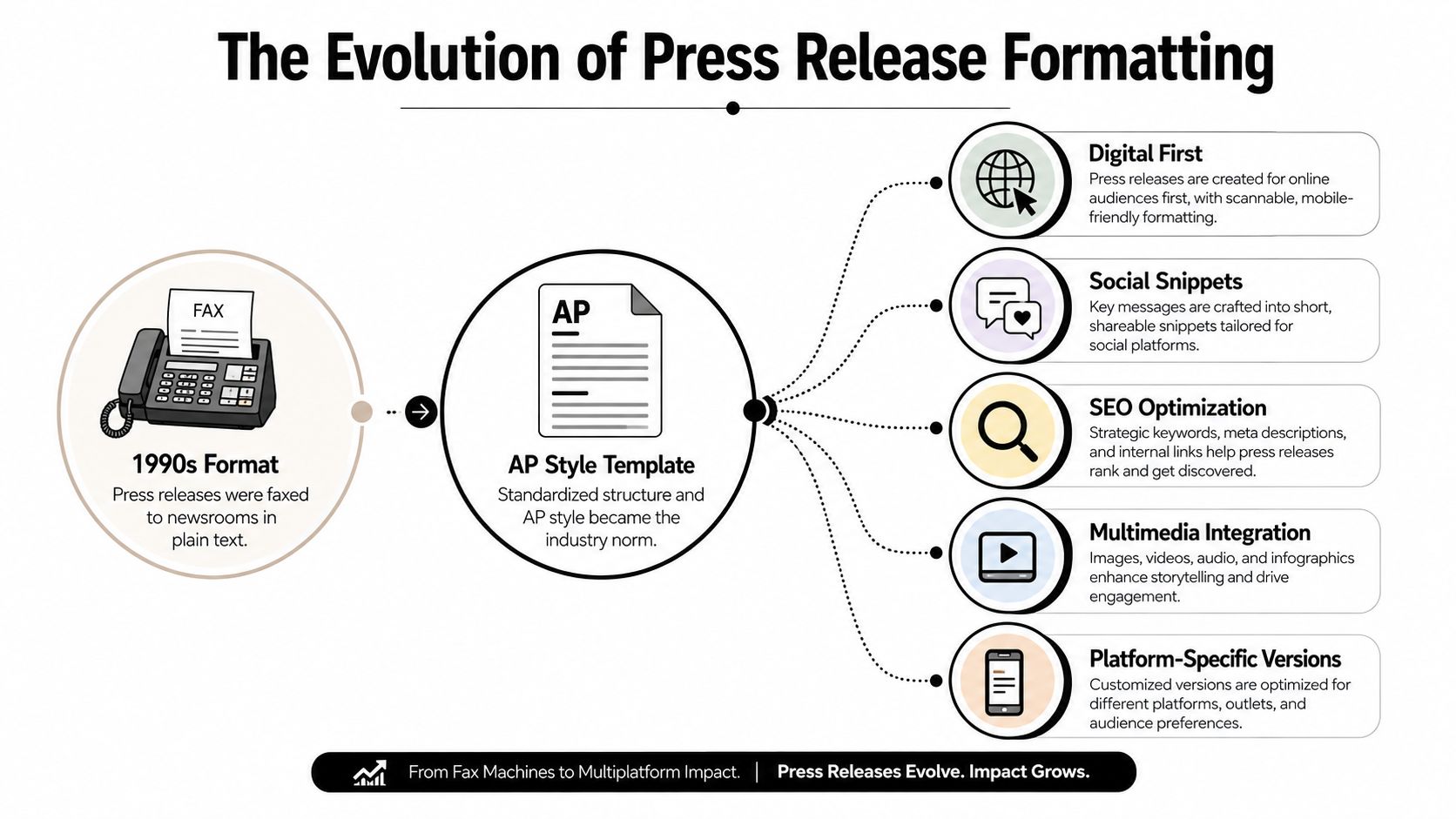
Format for the surface that matters most
A newsroom pickup favors quick scanning and easy copying. Search distribution favors a descriptive headline and a lead that makes sense without surrounding design. LinkedIn and mobile email favor short, front-loaded text that survives preview limits. A PDF favors stable layout, but it places an extra barrier between the story and the editor who needs to reuse a quote.
The strongest workflow treats the release as one editorial source with several delivery versions, not as one immutable file. Draft the text first, test the headline and lead without styling, then create the document formats needed for the audience.
Formatting discipline also applies to the underlying document itself. Teams preparing longer communications can borrow practical document-structure habits from BarkerBooks manuscript tips, particularly consistent headings, spacing, and clean page flow. A press release is shorter, but the same principle holds: visual polish should support comprehension, never compete with it.
Practical rule: If the release only makes sense when its logo, colors, and typography survive intact, the format is doing too much of the storytelling.
The evidence supports aggressive editing. Colorado State's historical formatting guide recommends a headline of no more than 10 words and full-block style with clear spacing and contact information at the end. More recent analysis cited in the same guidance found an average release length of 851 words and a median of 701 words, while journalists commonly say they will read roughly 400 to 500 words. Those figures make the editorial problem clear: a conventional release can be structurally correct and still bury its usable news.
The Seven Building Blocks of a Press Release
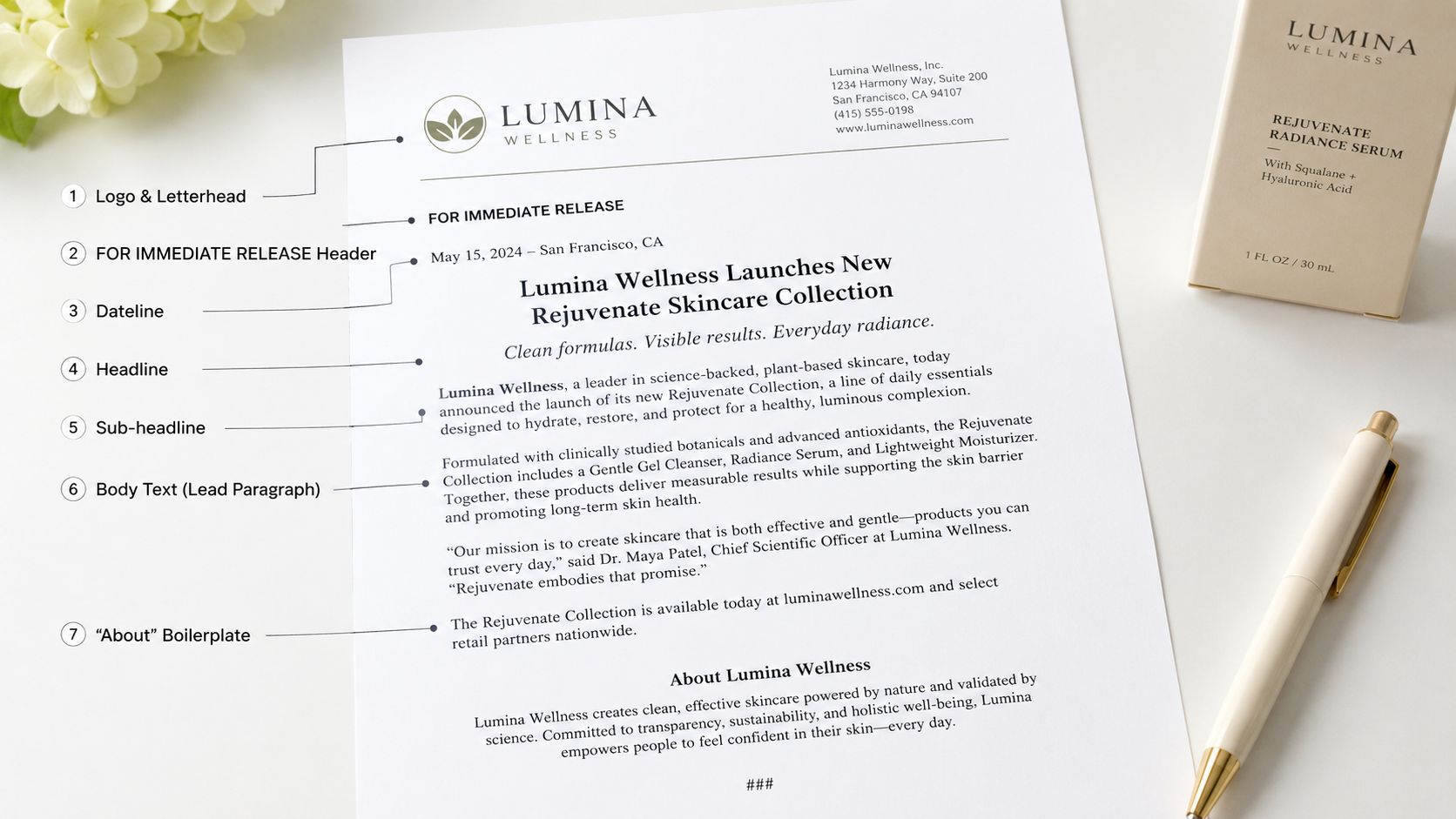
A useful release can be assembled from seven blocks, provided each block has a job. Consider a fictional B2B software company announcing a new inventory platform. The example below isn't a case study. It's a formatting model showing how the pieces should sit on the page.
1. Brand line and release label
Place the company logo or letterhead at the top, using a restrained size that doesn't push the news below the fold. Under it, place FOR IMMEDIATE RELEASE, unless the recipient has agreed to an embargo.
2. Headline and optional subhead
The headline should state the news, not advertise the product. A concise example is:
Northstar Launches Inventory Platform for Regional Retailers
A sentence-case subhead can add context:
New platform gives store teams a single view of stock across locations.
Keep the headline brief. One historical guide recommends no more than 10 words for the headline, while current digital guidance recognizes that search and social previews may require a somewhat longer descriptive line. The safest editorial choice is to put the essential subject and action at the beginning.
3. Dateline
The dateline identifies place and date:
BOSTON, November 7, 2026
Northstar Systems today announced…
Use a real city and an accurate date. The dateline should be visually distinct, but the body that follows should remain easy to copy.
4. Lead paragraph
The lead answers who, what, when, where, why, and how without forcing the reader to decode corporate language:
Northstar Systems today launched an inventory platform for regional retailers, giving store teams a shared view of stock across locations through one web-based dashboard.
That lead contains the announcement and its practical relevance. It doesn't begin with a slogan, a company history, or a product adjective.
5. Body
The body supplies supporting detail in short paragraphs. A practical target for the main body is 300 to 400 words, adjusted for the complexity of the announcement. Put the strongest evidence immediately after the lead, then explain background, availability, and next steps.
6. Quote
Use a named quote when it adds interpretation, customer relevance, or accountability. A product-launch quote might explain why disconnected inventory creates a problem for store teams. Avoid stacking executive praise that merely repeats the headline.
7. Boilerplate and contact block
The boilerplate gives the company's concise background. The media contact block follows it with a name, role, email address, and phone number. Finish with ### or -30-, following the production convention described by eCampusOntario's release guidance.
The finished structure should look like this:
[Northstar Systems logo]
FOR IMMEDIATE RELEASE
Northstar Launches Inventory Platform for Regional Retailers
New platform gives store teams a single view of stock across locations.
BOSTON, November 7, 2026
Northstar Systems today launched an inventory platform for regional retailers, giving store teams a shared view of stock across locations through one web-based dashboard.
[Supporting detail, evidence, and availability.]
“[A specific quote that adds meaning],” said [Name], [title] at Northstar Systems.
About Northstar Systems
[Concise company description.]
Media contact
[Name]
[Email]
[Phone]
A release that includes executive photography should treat the image as a separate asset, not as a substitute for a usable contact block. For presentation guidance on a professional newsroom-ready portrait, see these headshot tips for press releases. For a broader element-by-element reference, the eight key elements of a well-written press release provides another useful checklist.
PDF, Word, or Plain Text Choosing the Right Format to Send
No single file type wins every distribution situation. The right choice depends on whether the recipient needs to preserve layout, edit copy, or find the complete text quickly.
PDF preserves fonts, spacing, logos, charts, and embedded images. It suits investor announcements, embargoed product reveals, and releases whose visual presentation carries legitimate meaning. Its weakness is friction. A journalist may need to open the file, select text from a designed page, and clean up line breaks before using a quote.
Word is more practical for editorial collaboration. A reporter can copy a quote, revise a boilerplate, or extract background material directly from a .docx file. That convenience comes with risk: tracked changes, comments, hidden metadata, and accidental edits can make an attachment look unfinished. A clean Word file should be an editable source, not a substitute for proofreading.
Plain text in the email body is usually the safest option for wire distribution, social sharing, and online publication. It keeps the words visible without requiring an attachment, and a canonical web version gives readers one stable destination. Links should be limited and purposeful because a long list of URLs distracts from the announcement and may be flattened by social platforms.
| Factor | Word (.docx) | Plain Text in Email | |
|---|---|---|---|
| Layout control | Strong | Moderate | Minimal |
| Editorial copying | Can be awkward | Easy | Easiest |
| Visual assets | Strong | Moderate | Link to assets |
| Search readability | Depends on text layer | Usually usable | Strong |
| Main risk | Recipient doesn't open it | Tracked changes or edits | Loss of visual identity |
| Best use | Branded or visual announcements | Editorial pickup | Distribution and web publishing |
The decision rule is straightforward: branded visuals point toward PDF, editorial pickup points toward Word, and search visibility points toward plain text. Teams that need all three should draft one clean master copy and export controlled versions rather than asking each format to carry different wording.
A focused comparison of production trade-offs appears in PDF versus Word press release formatting. The important distinction is operational: the PDF is a presentation artifact, while plain text is the most portable editorial source.
AP Style Rules Every Formatted Release Should Follow
AP style still provides the visual grammar journalists expect. It makes the release easier to scan, reduces cleanup, and gives editors fewer reasons to distrust the copy. A polished layout can't rescue inconsistent dates, inflated titles, or numerals that force a newsroom rewrite.
Capitalization and headlines
Use title case for the main headline when that matches the organization's newsroom convention, but don't capitalize every word in the document. Use sentence case for subheads. Body copy should read like news copy, not packaging text.
A headline such as Northstar Launches Inventory Platform for Regional Retailers is clear. A headline such as Northstar Launches An Industry-Leading Inventory Platform For Regional Retailers looks promotional and makes the actual announcement harder to identify.
Numbers and dates
AP-style number rules require care. Spell out one through nine in ordinary text, use figures for 10 and above, and use figures for percentages and dollar amounts. Dates should use the full month where clarity matters, such as November 7, 2026, rather than Nov. 7th, 2026 or 11/7/26.
Attribution and titles
Name the source behind a factual claim. On first reference, identify a quoted speaker with their name, title, and organization. Later references can use the last name alone. Keep a title lowercase after a person's name, as in “Jordan Lee, chief product officer at Northstar Systems,” rather than “Jordan Lee, Chief Product Officer.”
Spell out an acronym on first use, then use the shortened form if it improves readability. Don't make the reader infer what an unfamiliar abbreviation means.
| Rule | Wrong | Right |
|---|---|---|
| Headline case | NORTHSTAR LAUNCHES A NEW PLATFORM | Northstar Launches Inventory Platform |
| Subhead case | New Platform Gives Retailers One View | New platform gives retailers one view |
| Numbers | eight stores and 12 regions | eight stores and 12 regions |
| Dates | Nov. 7th, 2026 | November 7, 2026 |
| Titles | Jordan Lee, Chief Product Officer | Jordan Lee, chief product officer |
| Acronyms | SaaS, on first reference | software as a service (SaaS), on first reference |
For a release-specific treatment of these conventions, the AP-style press release guide can serve as an editing reference.
Editor's margin note: The six frequent failures are headline overcapitalization, vague datelines, inconsistent numerals, unexplained acronyms, unnamed claims, and titles capitalized after a name. Each one signals that the release needs newsroom cleanup.
These rules remain useful even when software extracts summaries or republishes the text. Consistent syntax gives both editors and automated systems clearer signals about who acted, what happened, and when it happened.
Formatting for Different Announcement Scenarios
The seven blocks stay stable, but their order of emphasis changes with the announcement. A launch, crisis response, and grant announcement should not sound as though the same template was filled in three times.
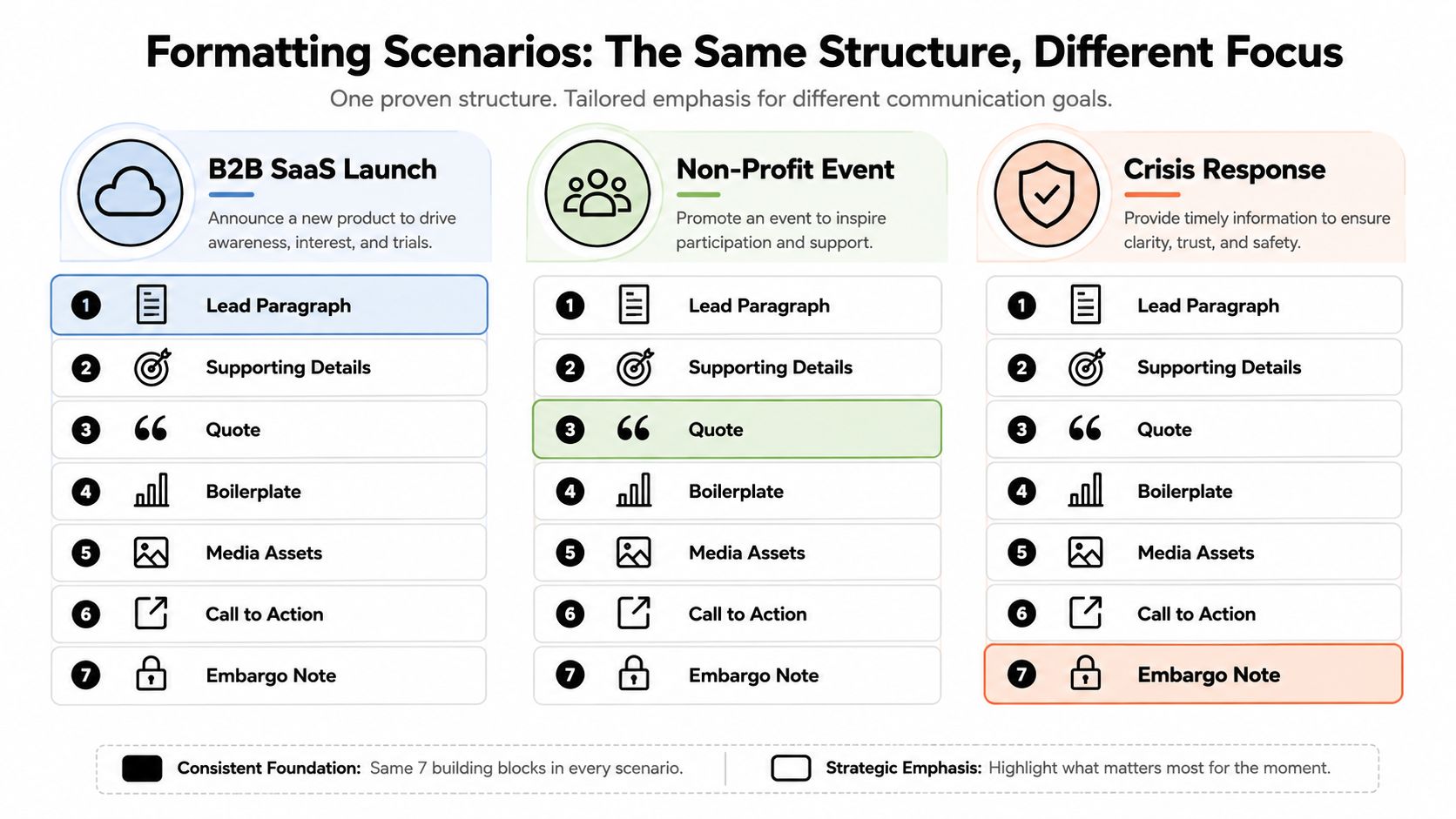
B2B SaaS product launch
Lead with the customer problem and the outcome. Features belong after the reader understands why the launch matters.
Example excerpt
FOR IMMEDIATE RELEASE
Northstar Launches Inventory Platform for Regional Retailers
BOSTON, November 7, 2026
Northstar Systems launched a platform that gives regional retailers one shared view of inventory across store locations. The announcement leads with the operational result, while technical features follow in the body for readers who need implementation detail.
“Store teams need a reliable view of what is available before they promise it to a customer,” said Jordan Lee, chief product officer at Northstar Systems.
The boilerplate can mention company background and funding later, but the release should remain product news rather than corporate-finance news. The contact block stays visible at the end.
Corporate crisis response
The headline should state the action taken, not repeat the incident. Put the time and location in the dateline, use one accountable executive quote, and shorten the boilerplate so reporters reach the facts quickly.
Example excerpt
NORTHSTAR SYSTEMS RESPONSE
Northstar Suspends Affected Service and Begins Independent Review
BOSTON, November 7, 2026, 10 a.m.
Northstar Systems has suspended the affected service and begun an independent review. The lead states the company's action before offering background.
“We've taken the service offline while the review proceeds,” said Jordan Lee, chief executive officer at Northstar Systems.
Additional updates should follow in a short body. The media contact belongs at the absolute bottom, where reporters expect to find it.
Nonprofit grant announcement
Lead with the grant and name the funder in the opening sentence. That makes the news immediately clear for readers and preserves the relevant entities when the release is syndicated.
Example excerpt
RIVERWAY FOUNDATION RECEIVES GRANT FROM HARBOR COMMUNITY FUND
PORTLAND, November 7, 2026
Riverway Foundation received a grant from Harbor Community Fund to support its neighborhood food-access program. The body explains the program, the grant's intended use, and the next public milestone.
“Support from Harbor Community Fund helps local partners extend services to residents,” said Maya Chen, executive director of Riverway Foundation.
The boilerplate should describe the organization, prior grant activity in qualitative terms, and tax status where relevant. The contact block should remain complete even when the release is distributed beyond the nonprofit's home market.
The structure is consistent. The lead, quote, dateline, and boilerplate carry different weight because the reader's first question changes in each scenario.
Pre-Send Checklist and Common Formatting Mistakes
A release should pass three separate inspections. Combining them into one rushed proofread is how obvious errors reach distribution.
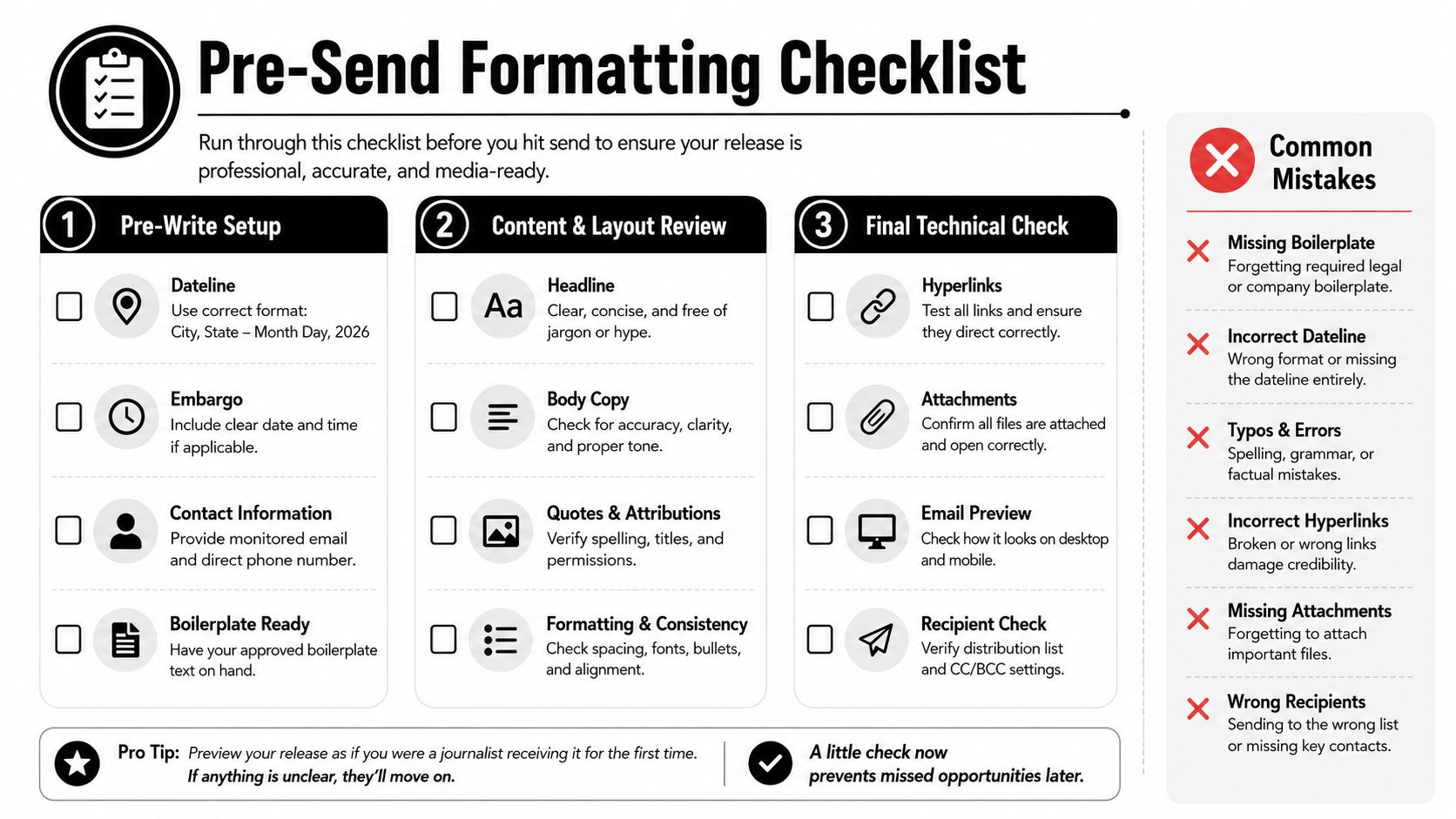
Pre-write setup
- Confirm the dateline: Verify the city, state or country convention, and current date.
- Set embargo language: If the announcement is embargoed, state the release date and time plainly.
- Assign a live contact: Use an email address and phone number that someone will monitor during distribution.
- Define the news angle: Decide whether the lead is about a launch, action, finding, appointment, grant, or event.
Content and layout review
- Test the headline: Keep the most important words at the beginning and remove decorative clauses.
- Audit the lead: Confirm that the first paragraph answers who, what, when, where, why, and how.
- Protect copyability: Don't embed essential text inside images, charts, or decorative elements.
- Inspect the boilerplate: Make sure it ends with a clear contact path rather than a brand slogan.
Final technical check
- Remove document residue: Accept tracked changes and delete comments before attaching a Word file.
- Check every link: Open each destination, confirm the anchor text, and remove broken or unnecessary links.
- Save alternate versions: Keep a clean Word file and plain-text copy so the release can be reused.
- Record distribution: Update the media or wire log with the version sent, date, recipient, and follow-up status.
Three mistakes repeatedly cause otherwise usable releases to be discarded. An orphaned boilerplate with no contact line makes the organization difficult to verify. A headline packed with sub-clauses and long dash punctuation is vulnerable to mobile truncation. A Word attachment containing tracked changes exposes internal editing and makes the file look careless.
AI-drafted copy needs an additional human pass. The wording may sound close to AP style while still using the wrong date form, capitalizing a title, attributing a claim vaguely, or placing the actual announcement after several lines of context. The editor should compare every factual sentence with the approved source material, inspect the plain-text version, and run the headline and lead through a phone-sized preview before sending.
Putting the Format to Work in 2026
The most reliable production habit is simple: build the release as plain text first, then apply presentation layers. The seven blocks remain the source structure, logo line, release label, headline, dateline, lead, body, boilerplate, and contact block. Their survival depends on what remains readable when design is removed.
The lead should work in a Google News preview, an email notification, a LinkedIn feed, and a PDF text layer without requiring the reader to open a second file. UBC's research news-release guide recommends an inverted-pyramid structure and a release of 500 to 600 words, organized around the lead, background, findings, lookahead, and credit. That model is especially useful when evidence or methodology matters, provided the most important finding doesn't wait until the end.
A practical workflow looks like this:
- Draft and edit the announcement in plain text.
- Apply AP-style corrections to names, titles, dates, numbers, and attribution.
- Create a clean web version with one canonical URL and accessible headings.
- Export a PDF when layout or visual assets matter.
- Provide Word only when an editor is likely to reuse or modify the copy.
- Paste the headline and lead into a mobile preview and remove anything that becomes confusing when truncated.
- Save the final versions and record exactly what was distributed.
Teams can make this repeatable by building a master template, auditing the last three releases against the pre-send checklist, and maintaining a distribution log that records format regressions. The point isn't to abandon the classic structure. It's to make every block portable enough to survive the surfaces where journalists and audiences encounter it.
Press Release Zen offers practical guides, templates, and format references for teams planning, writing, and distributing announcements, including support for AP style and PDF-versus-Word decisions. Visit Press Release Zen to turn the structure above into a repeatable newsroom-ready workflow.