Two hours before embargo, the draft is still blank, legal wants a clean method, the founder wants the headline sharper, and the newsroom contact keeps asking for “the latest version.” That's the moment when a template stops being a beginner's shortcut and starts being the only sane way to finish on time. A good template gives a comms team speed, structure, and consistency, and in technical or expert-facing work it also forces a methodology that another professional can reconstruct, which is exactly why templates show up so often in reporting and instructional workflows (American Statistician article on Excel templates, expert report methodology guidance).
That's especially visible in recurring communications work, where the same format has to survive leadership review, legal review, localization, and publication without drifting into chaos. The right template keeps labels, structure, and basic language consistent, while still leaving room for the actual news. A practical example is a nonprofit annual report framework such as Alignmint's report template, which shows how a controlled format can save time without turning the document into mush.

Table of Contents
- Why Templates Matter More Than Ever in 2026
- Choosing the Right Template for the Announcement
- Customizing Structure and Tone Without Breaking the Frame
- Picking the Right File Format for Distribution
- Embedding SEO and Distribution Into the Template Itself
- Governance, Version Control, and Reusable Masters
- Your Pre-Send Checklist, Common Pitfalls, and Quick Answers
Why Templates Matter More Than Ever in 2026
A founder staring at a blank document with an embargo ticking down does not need inspiration. They need a structure that already knows where the headline goes, where the quote belongs, and how the boilerplate should read when the release gets reviewed for the third time. That is the core reason how to use templates matters in press work. The release room rewards speed, consistency, and a format that holds up under scrutiny.
Templates matter because they keep format, labels, and structure consistent across recurring documents. That is exactly what comms teams need when a company keeps announcing, hiring, launching, correcting, and responding. In practice, the template is the operating system for the release, not the decoration around it. It gives writers a fixed frame so they can spend their time on the actual story, the proof points, and the wording that will survive legal and editorial review.
A template also sets expectations for everyone who touches the draft. When leadership, legal, finance, or technical reviewers come in late, they need a document that is easy to audit and easy to follow. Guidance on expert report writing makes the same point, the methodology has to be detailed enough for another qualified professional to reconstruct it, while still staying readable. A release that cannot hold that standard is not a useful template, it is a form with a few placeholders.
Practical rule: If the template does not reduce second-guessing, it is not doing its job.
That standard now applies across the whole workflow, not just the writing stage. A template needs version control, ownership, and a clear update process so teams do not keep recycling stale boilerplate or old positioning. It also needs room for localization and channel-specific edits, because a master draft that only works in one market or one distribution format is a brittle asset. A good template is a living master, one that can be revised without breaking the structure.
The same discipline shows up in other template-heavy fields. Excel template guidance has described prebuilt structures as useful because they let people reuse a working format instead of rebuilding from scratch, which is the same reason a press team should not start every release from an empty page. That logic is even stronger in PR, where the cost of drift is not just extra editing time, but a muddled announcement that slows approval and weakens pickup. For teams using a house style, a reference like Press Release Zen's AP style template gives the template a cleaner starting point without forcing every release into a generic mold.
The broader market proves the point. Canva, Visme, SlidesGo, and SlideModel all maintain large libraries of template-based statistics and infographic layouts, which shows how normal template-driven production has become across presentation, design, and data communication. For a communications team, that is not a nice-to-have trend. It is the baseline. The release has to be structured well enough to publish, distribute, localize, and reuse, or it will slow the team down every time it gets opened. A reusable master should also connect to the rest of the content system, including partner materials such as Alignmint's report template, so the same logic carries across recurring communications.
Choosing the Right Template for the Announcement
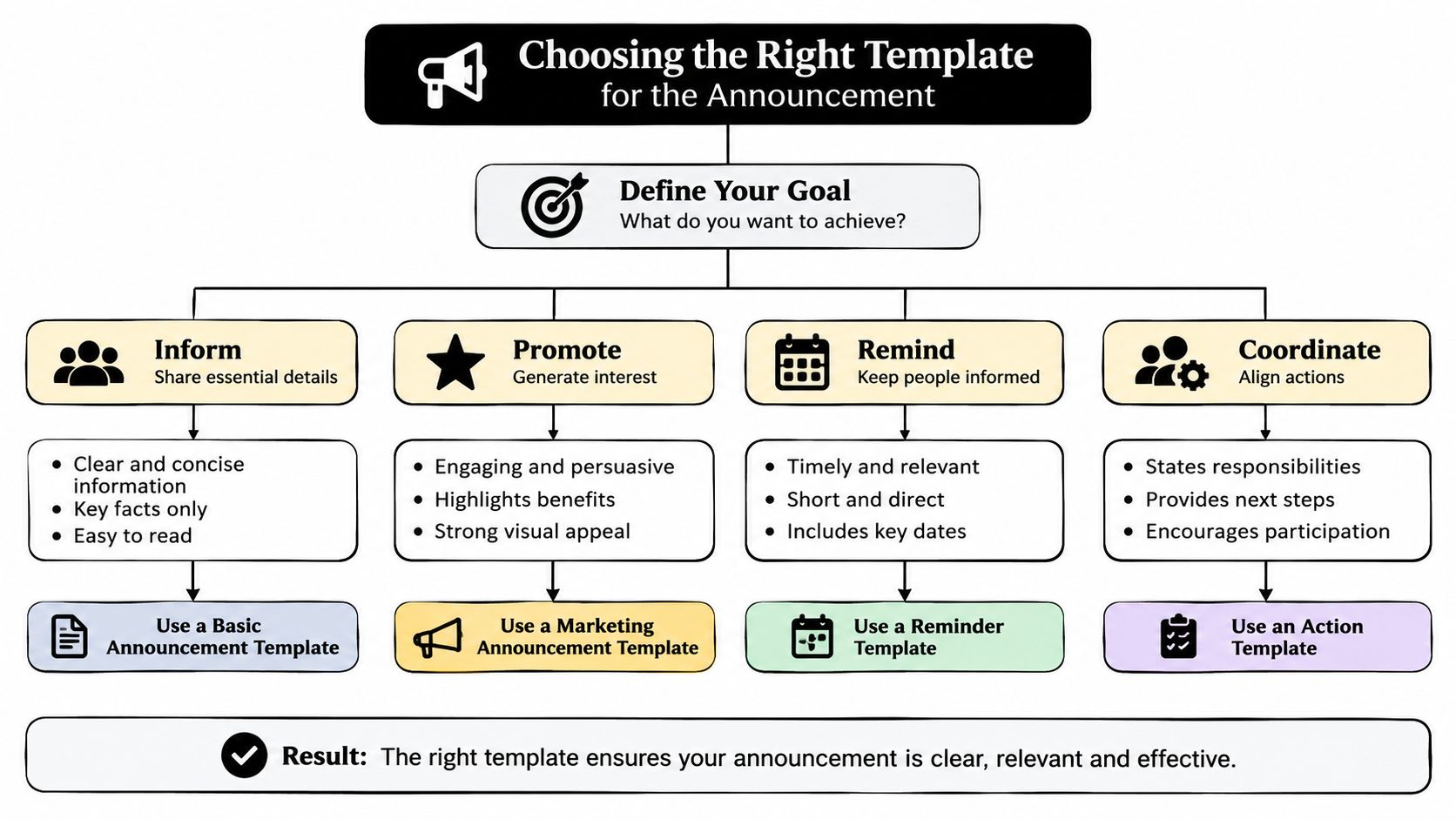
The wrong template is the fastest way to make a clean draft look confused. A funding announcement shouldn't be forced into the rhythm of an executive hire release, and a crisis statement should never look like a product launch with the excitement dial left on. Journalists notice mismatches immediately, because structure telegraphs story type before they read the third paragraph.
Match the structure to the news
A product launch template needs space for features, customer value, and what changed. A crisis response template needs a tight factual spine, a clear contact block, and careful phrasing that avoids escalation. Event releases need logistics to be instantly visible, while nonprofit, retail, real estate, and auto announcements often need sector-specific context that generic templates flatten out.
The smart shortcut is to study 3-5 strong examples before choosing a format. That approach is recommended in practical template guidance, where authors are told to gather several good examples, identify the shared structure, replace variable content with placeholders, and then test the draft with a real user before rollout (stepwise template creation guidance). That same source warns against overfitting the template to the first examples, which is the hidden trap in PR too. One polished launch release can mislead a team into copying a shape that won't survive a different story.
Look for structural cues, not just layout
A template built for another use case usually reveals itself fast. It may overemphasize promotional copy, bury the dateline, or leave no room for a quote that matters. A template for a sector newsletter can also carry the wrong expectations for press release pacing, which is why the answer is never “find a free one and fill it in.”
For teams that want a cleaner baseline, this press release template guide in AP style is a useful reference point because it keeps the focus on structure instead of decoration. The test is simple. If the template makes the news fit awkwardly, choose another one.
Customizing Structure and Tone Without Breaking the Frame
The temptation is to rewrite everything until the template no longer feels like a template. That's a mistake. The frame should stay intact, because the more a release drifts, the more it turns into marketing copy, and journalists can smell that a mile away.
Edit the parts that carry the story
The headline, subhead, lead paragraph, quote block, and boilerplate each do a different job. The headline has to carry the strongest load, because it's the first filter for human readers and search crawlers alike. The boilerplate is not filler, it's the company's reusable identity block, and it should stay tight, factual, and linkable.
A flat draft says, “Company X is excited to announce a new solution for modern teams.” A better version says, “Company X is launching a workflow tool that helps PR teams manage embargoed releases, localization, and approvals in one place.” The second line keeps the news in view and cuts the sugary language that usually gets trimmed later anyway.
Keep tone consistent, not loud
Tone breaks pickup when the release sounds like three different departments wrote it. The headline should be direct, the body should be factual, and the quote should sound like a human being, not a landing page. That means using active verbs, trimming soft adjectives, and putting supporting facts where they add clarity rather than weight.
A quote should expand the story, not repeat the headline in a new outfit.
Subheads should also earn their keep. They work best when they cue the next fact block instead of advertising the company. That's where a release becomes easy to skim, which helps both editors and readers decide whether to keep going.
A useful rule here is to treat every reusable element as part of the architecture. The quote can change. The order of sections can shift slightly. The frame itself should not wobble, because the frame is what makes the release feel publishable instead of improvised.
Picking the Right File Format for Distribution
Format choice is strategy, not preference. A writer may love a locked PDF, but journalists and editors usually need something they can copy, search, and revise without friction. The file type has to match the destination, not the ego of the sender.
| Format | Best for | Watch out for |
|---|---|---|
| Word | Journalist edits, internal review, structured drafting | Version drift if the master file isn't controlled |
| Google Docs | Collaborative drafting, live comments, remote approvals | Accidental edits and link sprawl |
| Final archive, simple posting, visual lock-in | Poor editability and friction for reporters |
Use each format for the job it's built to do
Word is the practical choice when the release still needs hands-on editing. Google Docs works when approvals happen in real time across distributed teams. PDF belongs at the end of the line, not the beginning, because it locks the content and makes clean reuse harder.
That is why locked PDFs are a weak default for outreach. They look finished, but they make life harder for the people who need to publish or quote from the release. For more detail on that trade-off, Press Release Zen's format guide on PDF versus Word is useful because it treats format as a distribution decision, not a design taste.
Make the default match the channel
If a release is going to a reporter, send a format that can be worked with quickly. If it's going on a newsroom page, a clean web version matters more than a locked attachment. If it's moving through internal review, live collaborative format beats static output every time.
The simplest rule is this. Draft in the most editable format, review in the most collaborative format, and publish in the format that best serves the reader. A PDF is rarely the starting point unless the goal is to freeze the page for archive or compliance.
Embedding SEO and Distribution Into the Template Itself
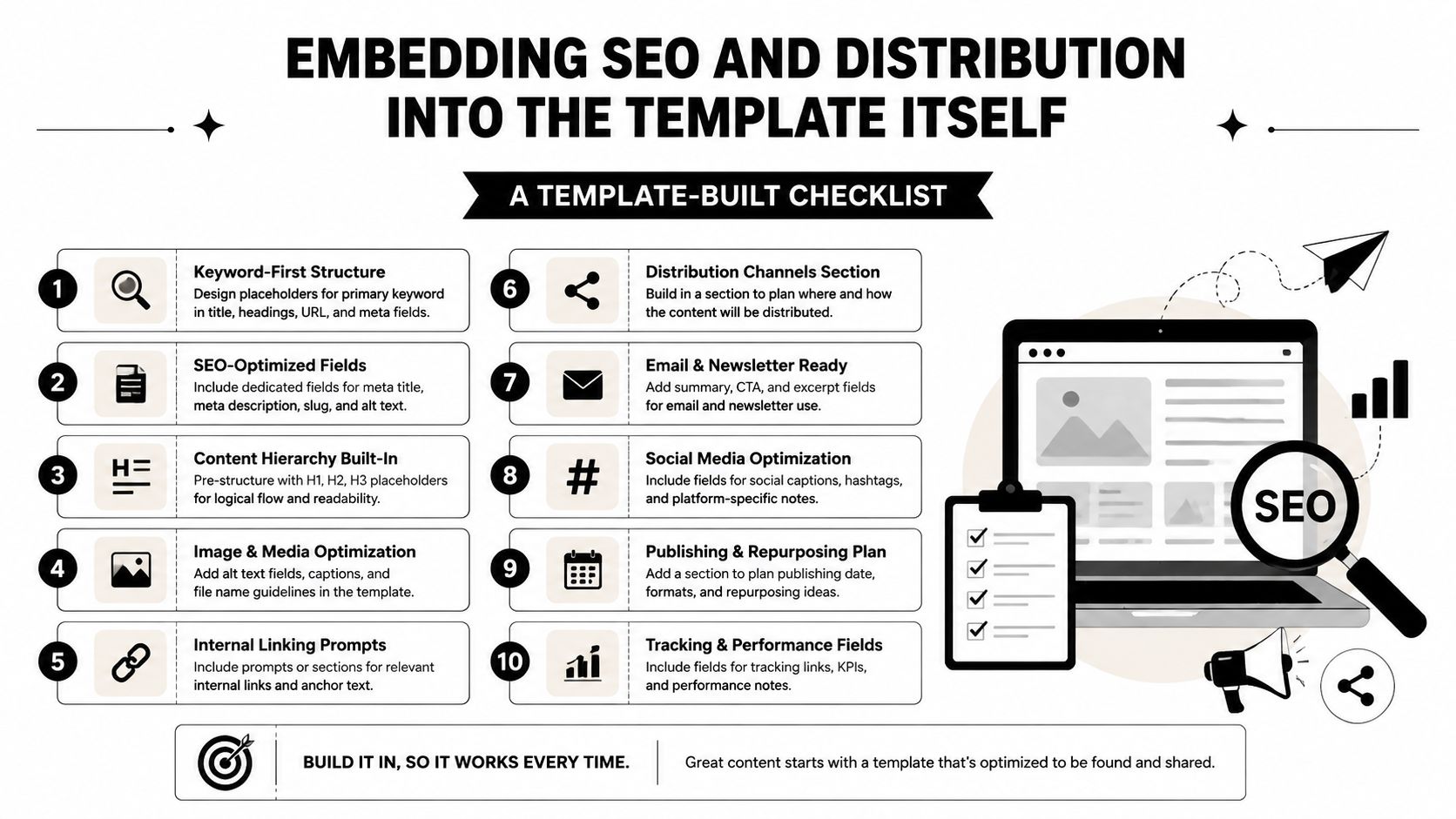
SEO shouldn't be an afterthought bolted onto the end of the release. It should be built into the template so every draft automatically creates the right signals, the right links, and the right structure for distribution. That includes the headline, subheads, boilerplate, dateline, and even the way the template handles hyperlinks.
Build the release for search and scanning
A release headline should read like something a human would click and a crawler can parse. That means clear nouns, specific action, and no generic fluff. Subheads should reinforce the topic using natural phrasing, and the boilerplate should include a clean, evergreen link back to the company site instead of a pile of vague brand language.
There's a practical reason to think this way. Guides on semantic variations for H2 tags focus on how related phrasing helps search clarity without forcing repetition, and that same idea works in press releases. The template should encourage variation where it improves readability, not keyword stuffing where it cheapens the copy.
Treat hyperlinks as SEO assets
The links inside a template do more work than many teams admit. The company description, product page link, newsroom link, and multimedia references can all help search and distribution if they're placed with intent. A release that includes a useful backlink in the boilerplate does more than announce news, it creates a durable path back to the brand.
A useful framework for that kind of buildout is covered in this press release SEO guide on keywords and metadata. The point isn't to stuff the draft with search terms. The point is to make the template capable of producing clean, indexable releases without a separate rescue operation every time someone opens a blank document.
Use structure to help Google News, not just readers
The dateline should clearly signal where and when the news is happening. Multimedia belongs when it adds actual context, especially for launches, events, or product visuals. Even the boilerplate should be written as a reusable block that supports distribution instead of dead-ending the reader at the company name.
The sharpest teams understand this: the template's hyperlinks and structure often do more distribution work than the body copy itself. If those pieces are sloppy, the release has already lost before outreach begins.
Governance, Version Control, and Reusable Masters
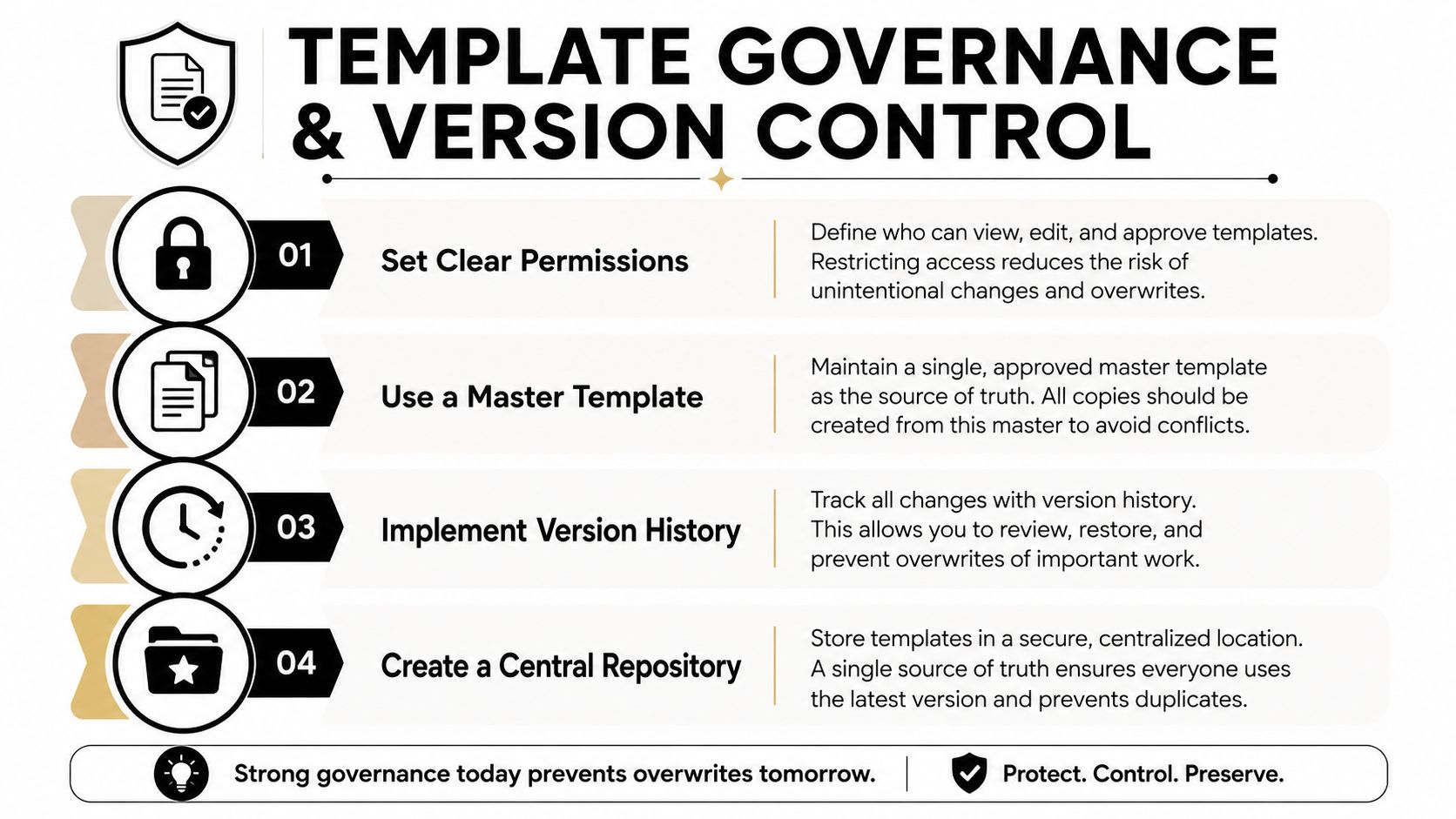
The most common template failure is not bad writing. It's somebody overwriting the master file and then three regional teams building from three different versions. Once that happens, nobody trusts the library, and every new release becomes a detective story.
Protect the master first
A reusable master has to be harder to damage than a working draft. That means clear permissions, a central repository, and editing boundaries that let local teams customize content without saving over the original source. In InDesign training, the warning is direct, users should be allowed to move content around without overwriting the original master, because doing so destroys the reusable version for future work (InDesign master template guidance).
That warning matters in PR just as much as design. If a master release template gets overwritten, the team loses consistency, and every future draft starts from a slightly different base. That's how small format mistakes become a pattern.
Localize without losing control
Regional teams need flexibility, but they do not need separate universes. A good governance model lets them swap datelines, contact details, language variants, and local references while preserving the structure that keeps the brand recognizable. That balance fits neatly with a broader framework for enterprise content management, which treats content control as an operational system, not a one-off editorial task.
A template library should also have version history, so reviewers can tell what changed and why. If a field is meant to be editable, make it obvious. If a section should stay fixed, lock it down. Ambiguity creates errors, and errors create mistrust.
Rule of thumb: If a teammate can't tell what can be changed in ten seconds, the governance is too loose.
Consistency at scale is the key benefit. A local market can adapt a master without breaking the source of truth, and the central comms team can still see exactly which release came from which version. That's the difference between a template system and a pile of documents.
Your Pre-Send Checklist, Common Pitfalls, and Quick Answers
The last pass should be mechanical, not creative. Check the embargo dateline, contact block, boilerplate links, headline length, image alt text, and the distribution channel before anyone hits send. If the release is going to reporters, the file should be readable, editable, and free of locked-down friction.
The mistakes that keep showing up are predictable. Vague quotes waste space. Marketing-speak headlines get ignored. Missing datelines weaken context. Locked PDFs make reporters work harder than they should. None of those errors are dramatic on their own, but together they make a release feel careless.
Quick answers
Can a crisis release use a template? Yes, but only as a controlled frame. The language has to stay factual, the approvals need to be tighter, and the template should never force upbeat copy into a serious situation.
How often should a master be refreshed? When the structure no longer matches the release type or when governance issues start showing up. A stale master is a silent problem, not a harmless one.
Are AI-generated drafts safe to template? Only if the team treats the output as raw material and checks every section against the approved frame, facts, and voice. A template can organize an AI draft, but it can't make an unreliable draft trustworthy.
The strongest teams don't just know how to use templates, they know how to keep them governable, searchable, and ready for the next announcement. Press Release Zen publishes practical template and distribution guidance for teams that need that kind of repeatable workflow, so if the next release needs a cleaner system, visit Press Release Zen and start with a template that won't fight the draft.