The alert comes in before the facts do. Support sees a spike in tickets. Sales starts getting messages from key accounts. Leadership wants a statement. Engineering is still diagnosing. At that moment, a downtime notification isn't just an operational update. It's a brand decision made under pressure.
Customers rarely judge an outage on technical details alone. They judge how quickly the company acknowledged the problem, whether updates stayed consistent, and whether the language respected the disruption to their work. Calm, clear communication won't erase downtime, but it can stop a service incident from turning into a trust crisis.
Table of Contents
- Your Downtime Communication Blueprint
- Writing Effective Downtime Messages
- Choosing the Right Channels for Your Alert
- Managing the Incident Communication Lifecycle
- Post-Incident Follow-Up and Trust Building
- When Downtime Demands a Press Release
Your Downtime Communication Blueprint
At 2:13 a.m., the login service fails, support tickets spike, and the executive team wants answers before engineering has a root cause. In that moment, customers are judging more than uptime. They are judging whether your company communicates like it is in control.
A downtime blueprint protects trust before it protects optics. It gives the incident team a clear path for who speaks, what gets approved, and how fast the first public update goes out. Earlier guidance on outage response timing makes the operational point. The brand and reputation point is just as important. Silence signals confusion. Conflicting updates signal poor leadership.
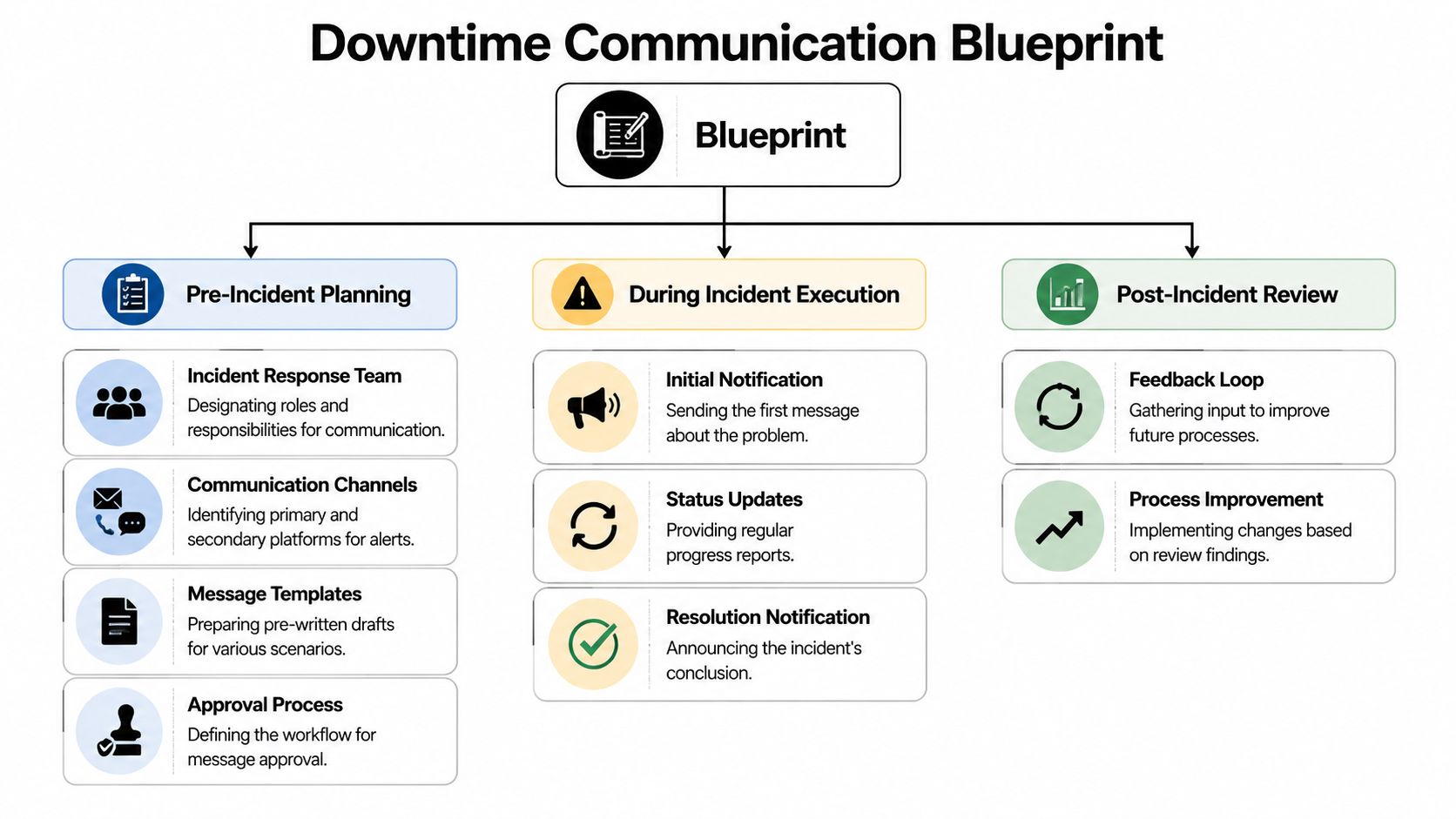
Build the plan before the outage
The first job is to define incident severity in language communications, support, and leadership can apply quickly. Engineering may classify an event by systems affected. Customers experience it by blocked work, missed transactions, and uncertainty about what to do next.
Use severity levels that translate directly into communication actions:
| Severity | What it means externally | Communication trigger |
|---|---|---|
| P1 | Core service unavailable or major business workflow blocked | Immediate public update and internal executive alert |
| P2 | Significant degradation, partial outage, or high-risk functionality failure | Fast targeted customer notice and support alignment |
| P3 | Limited impact, workaround available, lower urgency | Targeted notice if user action or awareness matters |
| P4 | Minor issue or internal-only concern | Internal tracking, public messaging only if user impact changes |
Good severity definitions reduce debate. They also prevent a common reputation mistake. Teams often wait to communicate because the technical picture is incomplete, even when the customer impact is already obvious. A workable model tells the communications team when to speak based on business effect, not perfect diagnostics.
Assign ownership and escalation
Outage messaging breaks down when authority is vague. A draft sits in Slack. Legal wants a review. Support posts one version, social posts another, and account managers start freelancing explanations for important customers.
Set four owners in advance:
- Incident lead who confirms the incident and sets severity
- Communications owner who drafts and updates the external message
- Approver who can clear the message fast based on severity
- Distribution owner who publishes across the status page, email, internal channels, and any public accounts
Backups matter. Nights, weekends, and regional holidays expose weak approval chains fast.
Teams that need a starting point should use a crisis communications plan template to document approvals, escalation paths, holding statements, and media handling before the first high-pressure event.
Create a usable blueprint
The operating version should be short enough to use under stress. One page is usually enough for the live response document, with supporting detail linked behind it.
Include these elements:
- Source of truth: The channel that carries the official incident status
- Audience map: Customers, prospects in active deals, internal staff, partners, and reporters
- Template set: Initial alert, progress update, workaround notice, resolution notice, and executive brief
- Approval thresholds: Which scenarios require legal, PR, or leadership review
- Update cadence: How often the team posts even when there is no resolution yet
- Channel safeguards: A quick check to Check your subject line and email content for spam trigger words before sending broad email alerts
That last point gets missed. If your outage email lands in spam, the message fails even if the wording is good.
A usable blueprint also reflects the full communication lifecycle. Scheduled maintenance, a live outage, a rollback, and a false alarm each require different public handling. Mature teams plan for those state changes in advance so customers see a steady, credible narrative instead of a stream of disconnected alerts.
Writing Effective Downtime Messages
Most bad outage messages fail in predictable ways. They bury the impact, hide behind jargon, or promise an end time nobody can support. Customers don't need a technical brain dump. They need a clear statement of what broke, what it affects, and when the next update will arrive.
The message should lower uncertainty, not add to it.
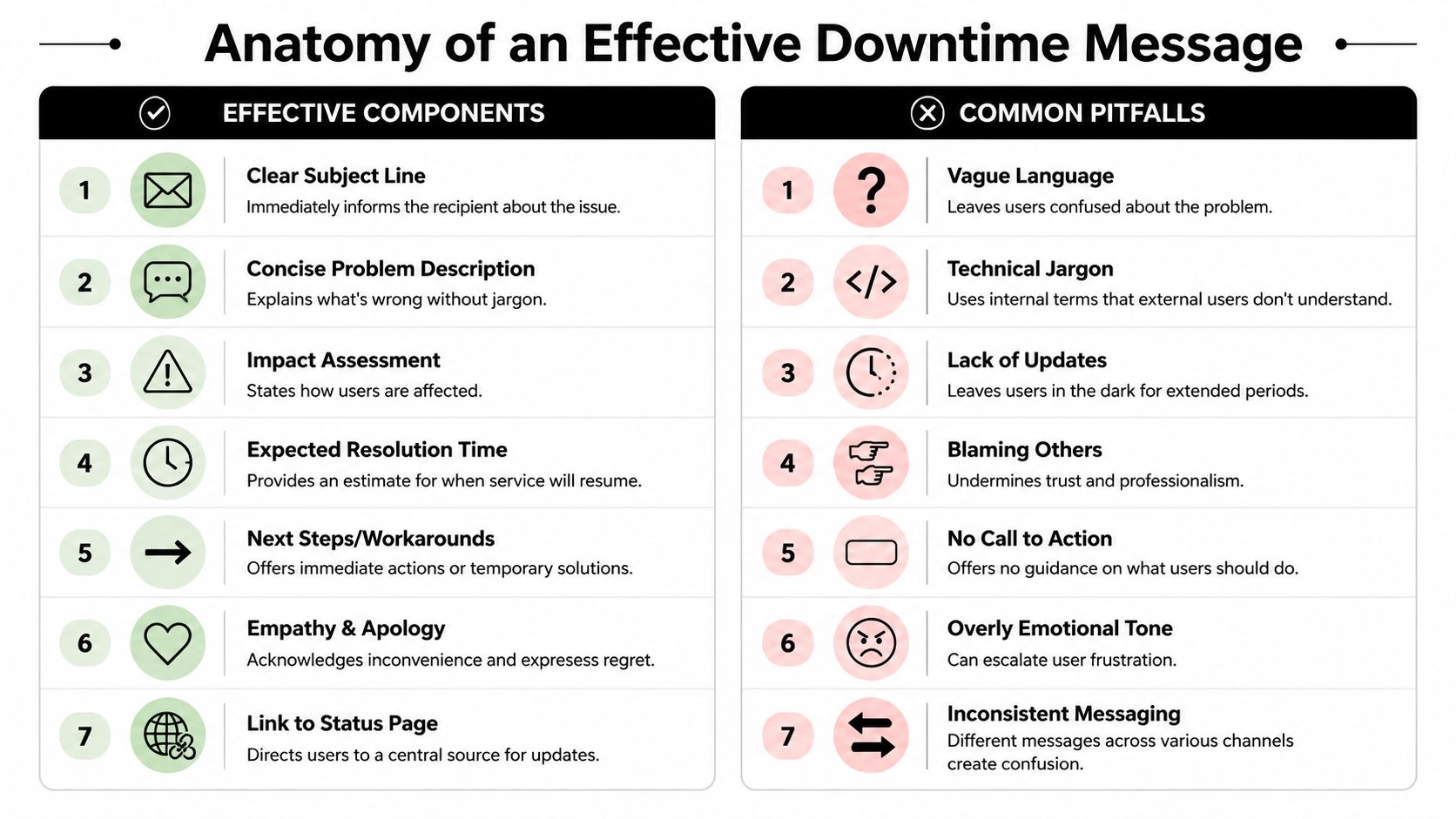
Use a message structure customers can scan
A strong downtime notification usually has seven parts:
A direct subject line
Say what's happening. "Service outage affecting logins" is better than "Important update."A short problem description
Describe the issue in plain language. Avoid internal labels and stack references.Impact statement
Tell users what they can't do, or what may be slow, unavailable, or inconsistent.Affected services
Name the product areas, integrations, or workflows involved.Current response
State that the team is investigating, mitigating, or restoring service.Next update time
Give a time for the next communication, not just a vague promise to follow up.Status page or support route
Direct people to one reliable place for updates or urgent help.
A simple template works well:
Subject: Service issue affecting [feature or product]
Message: The team is investigating an issue affecting [services]. Users may be unable to [task] or may experience [specific symptom]. Work is underway to identify the cause and restore normal service. The next update will be shared by [time and time zone]. Current updates are available on the status page.
That structure also works for internal teams. The difference is the detail level, not the basic shape.
One practical check before sending email alerts is deliverability. During a live incident, a notification stuck in spam is almost as bad as no notification at all. It's worth using a tool to check your subject line and email content for spam trigger words before finalizing recurring outage templates.
Handle uncertainty without sounding evasive
The hardest moment in outage communication comes early, when users want an ETA and the technical team doesn't have one yet. Chameleon highlights a gap many teams mishandle. When restoration time is uncertain, the better approach is to communicate what is known, what is unknown, and when the next update will arrive, rather than forcing a false ETA in Chameleon's downtime notification guidance.
That principle matters because confidence theater backfires. If a company says service will return in thirty minutes and then misses that target repeatedly, customers stop trusting every later message.
Tell people the truth in three parts. What is affected. What the team is doing. When the next update will come.
Better wording when ETA is unknown:
- Good: "The team has identified the affected service area and is actively diagnosing the cause. A restoration time isn't confirmed yet. The next update will be posted at 3:30 PM UTC."
- Bad: "We expect service to be restored shortly."
- Worse: "We're aware some users may be having issues," when the product is plainly unavailable.
Teams often think precision builds trust. It only does when the precision is real.
Good and bad message examples
A side-by-side comparison helps sharpen judgment.
| Situation | Better message | Weaker message |
|---|---|---|
| Login outage | "Users are currently unable to sign in to the dashboard. The team is investigating. Next update at 14:00 UTC." | "We are aware of a potential authentication anomaly." |
| Partial degradation | "API requests may be delayed, while the web app remains available. Retry logic may succeed for some requests." | "Systems are experiencing intermittent performance-related events." |
| Unknown ETA | "Service remains affected. A restoration time isn't confirmed yet. The next update will be shared in 30 minutes." | "We hope to resolve this soon." |
Three writing habits consistently improve downtime notification quality:
- Name the user impact first: Lead with what customers experience, not the internal cause.
- Remove blame language: Customers don't care whether a vendor, cloud platform, or deploy caused the issue in the first notice.
- Keep tone steady: A calm apology works. Defensive wording doesn't.
Message check: If a customer reads the update and still doesn't know whether they can work, the message isn't finished.
Choosing the Right Channels for Your Alert
A good message can still fail if it lands in the wrong place. Some users check email. Others look for an in-app banner. Enterprise customers may expect direct outreach from an account team, while the public may watch social channels first. Channel choice shapes how the incident feels. Organized communication looks intentional. Scattered communication looks panicked.
Paessler's guidance points to an overlooked challenge. Teams often know they should use email, status pages, social media, SMS, in-app banners, and internal tools, but they don't always know how to segment those options by audience, region, or severity. It also makes the useful point that too much technical detail can confuse people, and that the most effective notice often tells each audience what they can still do, what is blocked, and where to get the next update in Paessler's maintenance communication article.
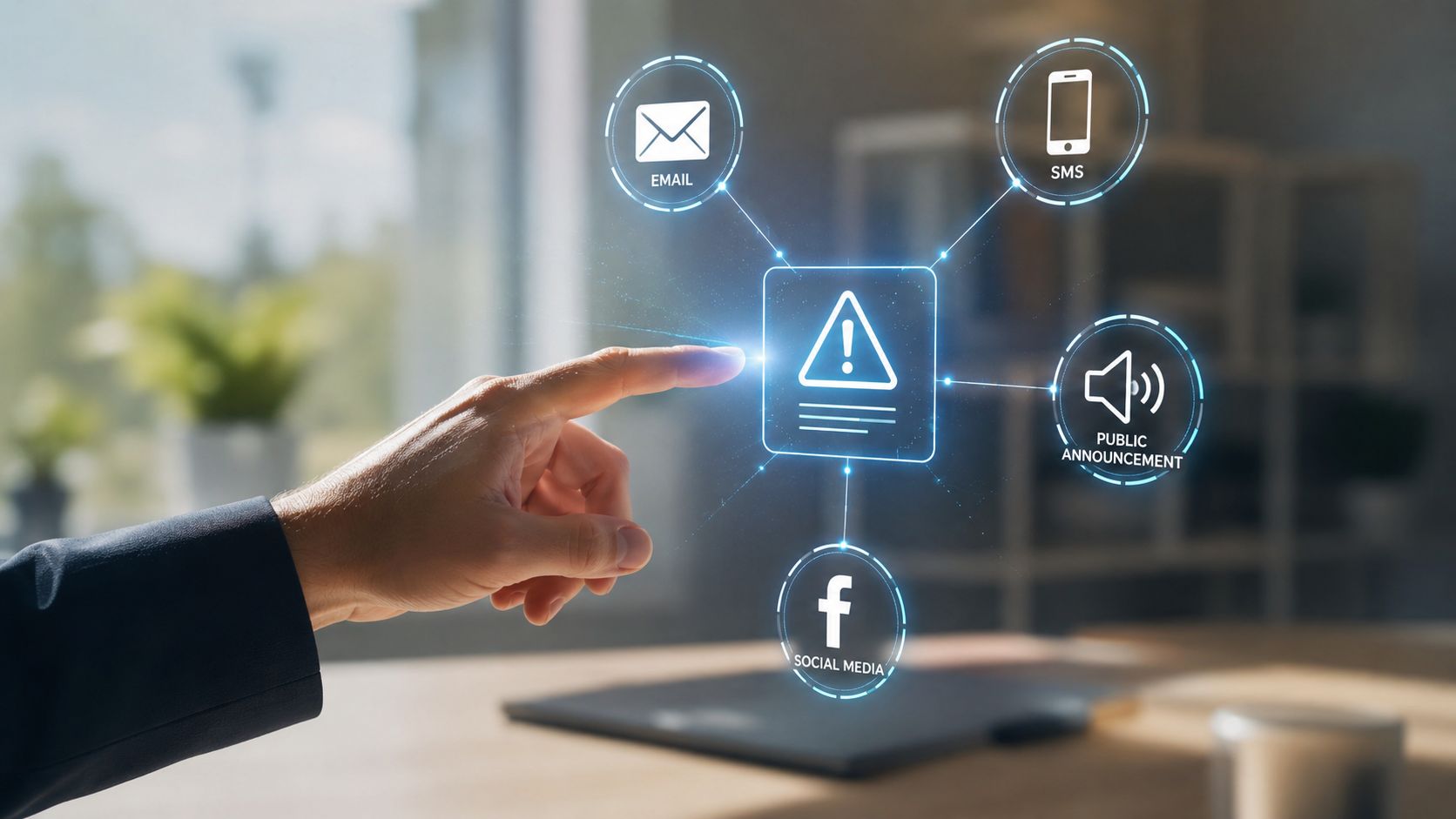
Match the channel to the audience
The status page should usually be the source of truth. It gives customers one reference point and helps prevent contradiction between email, social posts, and support responses.
After that, channel selection becomes a segmentation problem:
| Channel | Best for | Risk if overused |
|---|---|---|
| Status page | Canonical updates, timeline, resolution history | Customers must already know to check it |
| Detailed notices, enterprise stakeholders, scheduled maintenance | Delays, spam filtering, inbox overload | |
| In-app banner | Immediate warning to active users | Useless if the app is fully inaccessible |
| SMS or phone alerts | High-severity incidents for critical internal teams | Fatigue if used for lower-impact issues |
| Social media | Broad awareness, fast public updates, rumor control | Can amplify alarm if wording is sloppy |
| Customer success outreach | High-value accounts and regulated buyers | Hard to scale during a fast-moving incident |
Email remains central, but delivery matters. Teams that depend on operational email should make sure their sending setup is stable before an incident starts. For organizations reviewing their mail infrastructure, guidance on how to configure Google SMTP relay can help reduce preventable delivery friction in business notification workflows.
Build a layered distribution model
The best approach isn't one channel. It's a sequence.
A practical model looks like this:
- Public status page first: Publish the short factual statement and timestamp it.
- Direct customer alert next: Email or in-app notice points back to the status page.
- Internal alignment immediately after: Sales, support, and leadership get a version suited for customer conversations.
- Social only when needed: Use it when the incident is broad, visible, or already being discussed publicly.
- High-touch outreach for key accounts: Give enterprise clients a version with impact, workaround, and next checkpoint.
Support teams should never improvise from scraps in a shared chat. They need pre-approved talking points and a channel-specific playbook. Organizations managing public response alongside customer updates often benefit from guidance on crisis communications and social media because social posts require different discipline than a status page notice.
The right channel strategy doesn't broadcast the same paragraph everywhere. It gives each audience the amount of detail they need to act, no more and no less.
Managing the Incident Communication Lifecycle
An outage unfolds in stages. Communication should too. Teams that treat downtime notification as a single alert usually create the same failure twice. First they send a hurried announcement. Then they go quiet for too long.
Zigpoll recommends separating scheduled and unscheduled downtime workflows. Planned maintenance should use advance notices at intervals such as 7 days, 24 hours, and 1 hour before the event, while unplanned outages should trigger immediate alerts and follow-up updates every 15 to 30 minutes until resolution, as outlined in Zigpoll's workflow guidance for database downtime notifications.
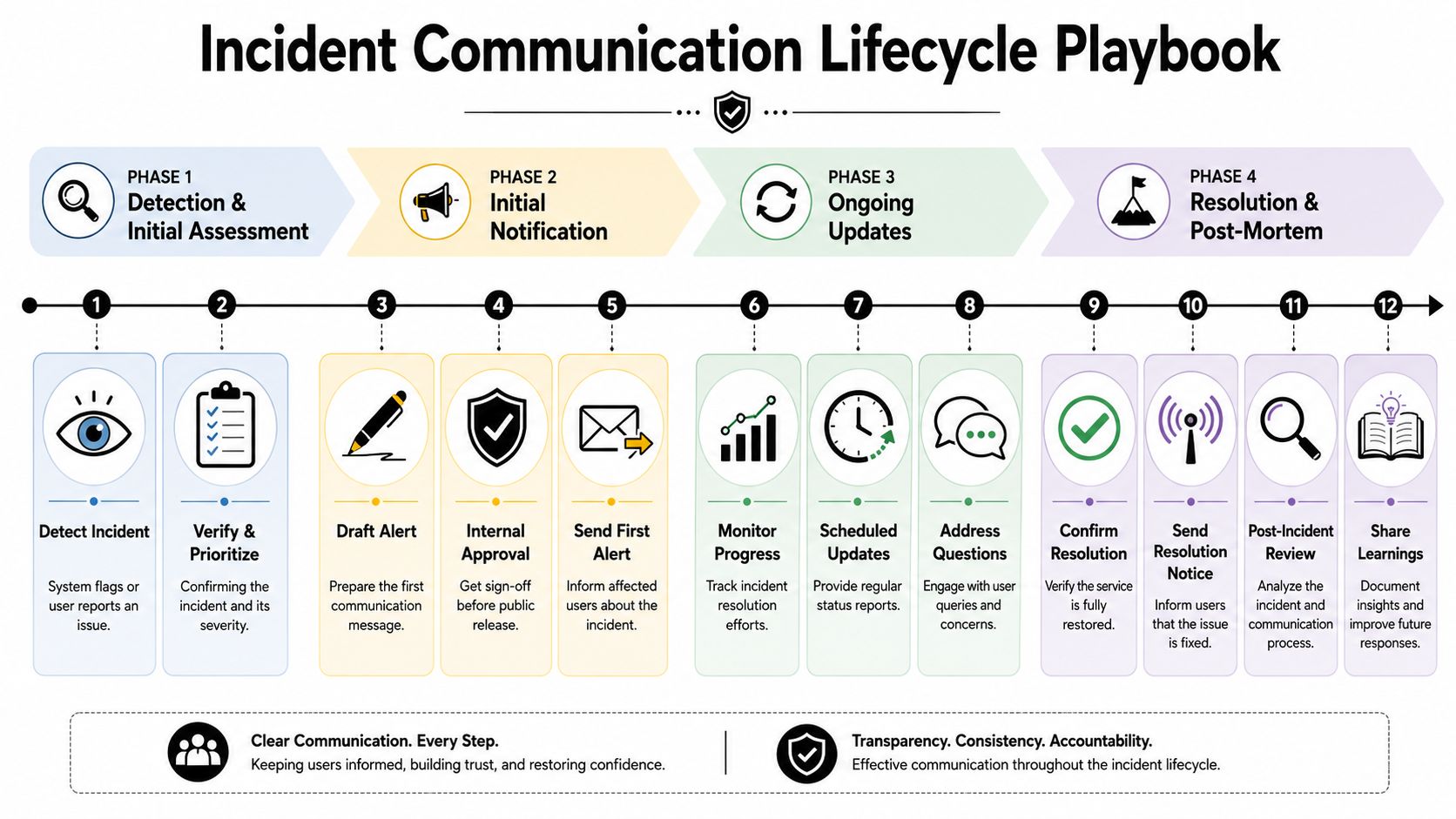
Scheduled maintenance follows a different rhythm
Planned work gives teams one major advantage. They know it's coming. That means the communication can reduce surprise instead of reacting to it.
A scheduled maintenance sequence usually works best when each notice has a different purpose:
- 7 days before: Explain what service area is affected and who needs to plan around it.
- 24 hours before: Confirm timing, impact window, and available workarounds.
- 1 hour before: Remind active users and internal teams that the window is about to begin.
- Start of maintenance: Confirm the work has started.
- Completion: State that maintenance is complete and service is operating normally.
The common mistake is sending one announcement and assuming people will remember it. They won't. Repetition is part of reliability.
A live outage scenario
A live incident needs a tighter rhythm. Consider a realistic sequence.
At 10:04, monitoring flags show increasing failures and support tickets begin to rise. By 10:08, the incident lead confirms a real issue affecting checkout. At 10:10, the first status page notice goes live: checkout is failing for some users, investigation is underway, next update at 10:30.
At 10:30, the technical team still doesn't have a fix. The update still goes out. It says the issue remains active, the team is narrowing the cause, and the next update will come at 10:45. That message matters because silence creates more anxiety than a brief status report with no resolution yet.
At 10:44, the team isolates the failure and starts mitigation. The next customer update changes the wording from "investigating" to "identified" and explains any workaround if one exists. At 11:12, transactions begin recovering. The following message says service is improving but monitoring continues. Only after stability is confirmed does the final notice mark the incident resolved.
Customers can accept uncertainty. What they won't accept is disappearing communication.
This rhythm does two jobs at once. It helps users plan their own next steps, and it shows the company is operating with discipline under pressure.
Post-Incident Follow-Up and Trust Building
Service restoration closes the operational incident. It doesn't close the reputation gap. Customers want to know whether the company understands what happened and whether it has done anything meaningful to prevent a repeat.
A public follow-up doesn't need to read like an engineering postmortem. It should read like accountable leadership.
What the follow-up should include
A strong post-incident note usually contains five elements:
- Acknowledgment: A plain apology that names the disruption.
- Impact summary: Which services or workflows were affected.
- Root cause in plain language: Enough detail to be credible without drowning readers in internals.
- Corrective actions: What was changed immediately.
- Prevention work: What the organization is doing next.
This kind of follow-up changes the tone of the incident. Instead of ending with "it's fixed," the company shows that it learned, documented, and acted.
Turn incident records into better decisions
Dataparc recommends collecting downtime data in a structured way using who, what, when, where, why, and how, then analyzing incidents by factors such as duration, cause, process area, and error codes. That data supports Pareto analysis to identify the highest-impact causes and a payoff matrix to prioritize fixes, as described in Dataparc's guidance on reducing downtime in manufacturing operations.
That framework matters for communications too. Without structured records, teams repeat the same messaging failures. They don't know whether approvals slowed the first alert, whether support had the right talking points, or whether a specific audience missed updates entirely.
A post-incident review should ask questions such as:
- Did the first message go out fast enough?
- Did each audience get the right amount of detail?
- Were promised update times met consistently?
- Did support, sales, and leadership use the same language?
- Which customer questions kept repeating?
Teams that document answers well respond better next time. Strong internal knowledge sharing also makes handoffs cleaner across PR, support, and operations. Organizations refining that process may find it useful to study how to improve team efficiency with KM, especially when incident learnings need to be reused instead of rediscovered.
A postmortem isn't reputation cleanup. It's evidence that the company takes customer disruption seriously enough to learn from it.
When Downtime Demands a Press Release
Many teams still treat downtime as an IT-only matter until the story is already public. That's too late. Some incidents cross a clear line where a status page and customer email no longer carry the full communication load.
UpKeep reports that the average cost of downtime across all businesses was about $260,000 per hour in 2016, and that manufacturers could face up to 800 hours of downtime per year, according to UpKeep's overview of downtime facts and prevention practices. Once losses reach that level, communication stops being a courtesy update. It becomes executive risk management.
A press release becomes appropriate when the outage is large enough to affect public confidence, media scrutiny, investor concern, or major customer relationships. Common triggers include prolonged disruption to a critical service, confirmed data loss, sustained impact across multiple regions, or visible consequences for high-profile clients and partners.
A formal statement does three things that routine notifications don't always do well. It gives reporters and stakeholders a single quotable source of truth. It shows leadership is engaged. It reduces the chance that speculation defines the narrative first.
The key is restraint. Not every outage deserves a press release. But once the incident becomes a reputational event, avoiding formal media communication can look evasive rather than efficient. Teams facing that threshold need a disciplined public statement, not a patchwork of support replies and social posts. A practical guide to writing a crisis communication press release can help communications teams prepare that escalation path before they need it.
When an outage turns into a public trust test, teams need more than instincts. Press Release Zen offers practical templates, crisis communication guidance, and press release writing support that help organizations respond with clarity when the pressure is highest.