A media advisory is your golden ticket to getting journalists to your event. It's a standardized, one-page invitation, and we've got free templates in both Word and PDF to help you lock in that media coverage. The whole point is to give reporters the essential details fast, so they can decide if your event is worth their time.
Your Essential Media Advisory Template and Why It Works
Think of a media advisory as a direct, scannable invitation for a busy journalist, not a long-winded story. Its real power is in its universally recognized format. When it lands in a crowded inbox, it’s instantly familiar. A well-put-together advisory makes a reporter's job easier, and that alone dramatically boosts your chances of getting noticed.
This isn't about cutting corners. It’s about using a time-tested framework that journalists actually expect and appreciate. The standard structure means they can find the who, what, when, where, and why in seconds. It’s a lot like how free script writing templates give video creators a solid foundation to build on.
The Proven Power of a Standardized Format
The media advisory has been a public relations workhorse for over a century. What started as a simple event notice has become a structured tool that gets real results. When you use these templates correctly, they can increase media attendance by up to 40%.
Better yet, a 2024 study found that small businesses sticking to standardized advisory formats saw 28% more placements in Google News. The format just works.
A media advisory is the "save-the-date" for journalists. A press release is the full story. Confusing the two is a common mistake that can cost you coverage. To understand the key distinctions, check out our guide on the differences between a media advisory and a press release.
This framework respects a journalist's time by giving them only the most critical information upfront. It answers their immediate questions and helps them make a quick call on whether your event is a good fit for their audience.
Anatomy of an Effective Media Advisory
To see why this format is so effective, you need to understand its core parts. Each section has a specific job to do, and when they all work together, they create a clear, compelling invitation for the press. Knowing the purpose of each component helps you go from just filling in blanks to crafting a message that truly lands.
This table breaks down the key components every media advisory must include to be effective.
Anatomy of an Effective Media Advisory
| Component | Purpose | Best Practice Example |
|---|---|---|
| Headline | To immediately identify the document's purpose and grab attention with the core event detail. | MEDIA ADVISORY: Mayor to Announce City-Wide Green Initiative at Central Park |
| Dateline | To ground the advisory in a specific location and date, providing immediate context. | NEW YORK, NY – October 26, 2024 – |
| The 5 Ws | To concisely deliver the who, what, when, where, and why of the event in a scannable format. | What: Press conference on new tech hub launch. Who: CEO Jane Doe, CTO John Smith. |
| About Section | To provide a brief, standard description of your organization for context. | About XYZ Corp: XYZ Corp is a leading… |
| Media Contact | To provide a direct line for journalists to ask questions, schedule interviews, or RSVP. | Media Contact: Alex Chen alex.chen@email.com 555-123-4567 |
| ### | To signify the end of the advisory, a traditional and professional sign-off. | ### |
Nailing each of these sections is non-negotiable. They are the building blocks of an advisory that gets opened, read, and acted upon.
Crafting Each Section of Your Advisory for Impact
Getting your advisory right means moving from a blank page to a message so compelling a journalist can't ignore it. This isn't about just filling in a template; it's about making every single word count.
Remember, a reporter should be able to scan your entire document and get the gist in under 30 seconds. Clarity and brevity are everything. Let's walk through how to build each part so it grabs attention from the first line.
Nail the Headline and Dateline
The very first thing a journalist sees is your headline. It needs to be crystal clear and instantly signal what they're looking at, especially when their inbox is overflowing.
Always start your headline with “MEDIA ADVISORY” in all caps. This is a non-negotiable industry standard. It’s the universal signpost that separates your advisory from a press release, a pitch, or anything else.
After that, write a short, punchy summary of the news. Think of it as a tweet describing your event. Focus on the most newsworthy angle and use active language.
- Weak Headline: Media Advisory for Tech Conference
- Strong Headline: MEDIA ADVISORY: Governor to Announce New Statewide Tech Grant at Innovate 2024
Directly below the headline, you’ll add the dateline. This is a standard journalistic practice that grounds your advisory in a specific place and time. The format is simple: city and state, followed by the date you're sending it out. For example: MIAMI, FL – October 26, 2024 –
Structuring the Body with the 5 Ws
The body is where you lay out all the essential details. The absolute best way to do this is by following the classic "5 Ws" framework—What, Who, When, Where, and Why. This method ensures you cover everything a journalist needs to know in a logical, scannable format.
Use bolded headings for each of the 5 Ws. This creates clear visual cues, letting a busy reporter find the exact information they need without having to read the whole thing.
What: Get straight to the point. What is the event? A press conference? A product launch? A grand opening? Be specific.
- Example: A press conference to unveil the "Art in Our Parks" public installation series.
Who: List the key players. This means your speakers, special guests, or anyone available for an interview. Always include their full title and organization to establish why they matter.
- Example: Mayor Jane Smith; Lead Artist, David Chen; and Director of Cultural Affairs, Maria Rodriguez.
When: Give the exact date and time. Don't forget the time zone (e.g., 10:00 AM EST). If you have a specific schedule, like a media-only Q&A, this is the place to mention it.
Where: Provide the full physical address. If it's a virtual event, list the platform (like Zoom or Microsoft Teams) and include the direct link to join.
Pro Tip: For in-person events, think like a reporter. Including small logistical details like "Free on-site parking available" or "Media check-in at the main lobby" shows you respect their time and have thought through the experience for them. It makes a huge difference.
Why: Here’s your sales pitch. Why should anyone care about this event? What's the bigger story or impact? Connect your announcement to a current trend, a community issue, or something timely. This is what separates an advisory that gets coverage from one that gets deleted.
The About Section and Media Contact
After the 5 Ws, there are two final, crucial pieces. First up is the "About" section. This is just a short, two-to-three-sentence boilerplate paragraph about your organization. It gives reporters who might not know you the essential background context.
The last—and arguably most important—part is the Media Contact information. This is your call to action. It’s how a journalist will RSVP, ask for more details, or book an interview.
Make sure you include the following for your designated contact:
- Full Name
- Title
- Email Address
- Phone Number
Your media contact needs to be available and ready to respond quickly. A missed call or a delayed email can easily cost you a story. For a deeper look at getting all the professional formatting details right, our guide on the AP style press release template is a great resource.
Finally, end your document with three hash marks (###) centered on the page. It’s a traditional journalistic symbol that cleanly signals the end of the advisory.
Strategic Timing and Distribution for Maximum Pickup
Even the best-written media advisory will fall flat if it never reaches the right person or shows up at the wrong time. Nailing your distribution strategy is how you turn a simple document into actual reporters and cameras at your event.
The secret? Make the journalist's job easier. You need to get on their radar when they're actively planning their coverage, not when their schedule is already locked in. I’ve found a two-part send cadence works wonders, respecting their workflow while keeping your event top-of-mind.
The Right Time to Send Your Advisory
Your first send should go out 3 to 5 business days before your event. This is the sweet spot. It gives editors and reporters enough breathing room to consider your pitch, ask you questions, and assign a crew if they’re interested. Send it any earlier, and you risk getting buried and forgotten. Any later, and you'll likely find their day is already planned out.
Then, on the morning of the event, send a quick follow-up. A subject line like "REMINDER: [Event Name] Today at 10 AM" is perfect. It’s a gentle nudge that bumps your event right back to the top of a very crowded inbox.
Build a Media List That Actually Works
Blasting your advisory to a generic news@email.com address is the fastest way to get ignored. The real results come from building a targeted list of journalists who genuinely cover your industry or community. It takes some legwork, but the payoff is huge.
Start by mapping out the media outlets that matter to your brand, then put on your detective hat to find the right contacts.
- Look Past the Assignment Desk: Don't just target the general news desk. If you're a fintech company, find the finance and tech reporters. If you're a local nonprofit, connect with the community and lifestyle editors.
- Use Social Media: Twitter (now X) and LinkedIn are goldmines for this. A quick search for "[Your City] business reporter" or "[Your Industry] journalist" will often lead you straight to the people you need to reach.
- Invest in Pro Tools: If your budget allows, platforms like Muck Rack or Cision are built for this. They offer massive, searchable databases of journalists, including their contact info and recent articles, saving you countless hours of manual research.
Of course, your distribution strategy only works if the advisory itself is solid. This infographic shows the basic flow for putting together a document that reporters can scan and understand in seconds.
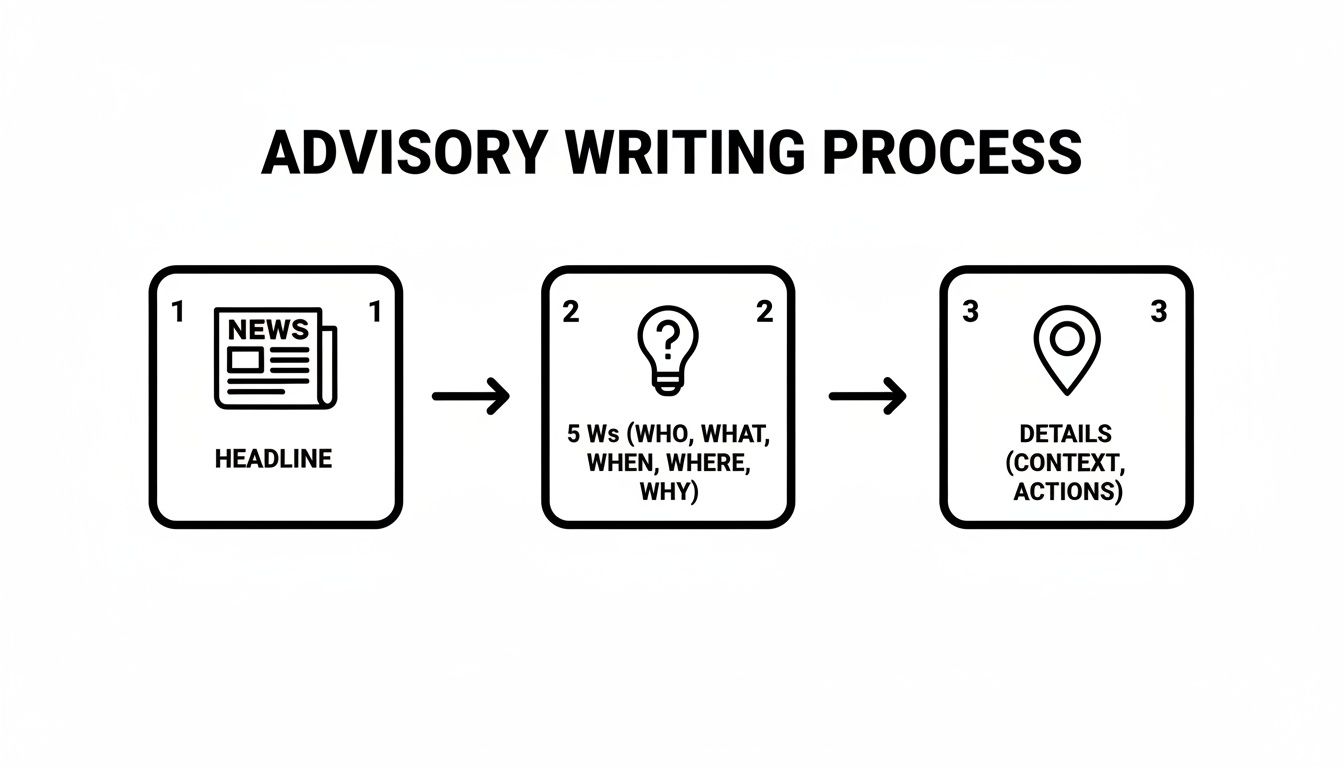
As you can see, a killer headline and the 5 Ws are the foundation. Get those right, and you're already ahead of the game.
Writing an Un-Ignorable Email Subject Line
Your subject line is your first impression. In a reporter's inbox, you have about two seconds to convince them to open your email. It needs to be clear, concise, and straight to the point.
Always lead with "MEDIA ADVISORY:" This immediately tells them what kind of email it is. From there, add the most newsworthy hook from your announcement.
Here are a few formats that work well:
- Local Event: MEDIA ADVISORY: Mayor to Announce Major Grant for City Arts Program
- Product Launch: MEDIA ADVISORY: Local Tech Firm to Unveil New AI-Powered Accessibility App
- Nonprofit Fundraiser: MEDIA ADVISORY: Celebrity Chef Headlines Charity Cook-Off for Food Bank
If you’ve done your homework and know a reporter’s specific beat, a little personalization goes a long way. For example: "MEDIA ADVISORY: New FinTech App Aims to Simplify Small Business Lending."
Remember, the goal is to be informative, not clever. Journalists appreciate straightforward subject lines that tell them exactly what's inside and why it matters to their audience.
And don't forget the technical side. Your perfectly pitched email is useless if it lands in the spam folder. It's worth taking the time to understand and master basic email deliverability strategies.
Data from 2023 shows that advisories using a clear, templated format see 52% higher open rates than unstructured emails. That number gets even better when you send to a highly targeted list, with some agencies seeing their reach amplified by 3x. Keeping your advisory to a single page is also a must; we've seen open rates drop by 37% for documents that are too long.
Finally, while the 3-5 day rule is a solid starting point, the absolute best time to send can vary by industry. For a deeper dive into the numbers, check out our guide on the best time to send a press release.
Real-World Media Advisory Scenarios and Examples
A template is just a skeleton. The real magic happens when you put flesh on the bones with compelling, newsworthy information. To really see how this works, let's move past the theory and look at how this framework adapts to different industries.
Whether you're promoting a high-profile open house or announcing an urgent press conference, the core components are the same. What changes are the details—the hook, the speakers, and the reason a busy journalist should care. Here are a few ready-to-use examples you can learn from, with a quick breakdown of why they work.
Tech Startup Product Demo Day
Tech announcements need to punch through a wall of noise. Journalists in this space get dozens of pitches a day, so your advisory has to be sharp, impactful, and laser-focused on what makes your innovation different.
MEDIA ADVISORY: Local Startup ‘ConnectSphere’ to Unveil AI Tool That Ends Social Isolation for Seniors
WHAT: Live product demonstration and media Q&A for ConnectSphere, a new AI-driven communication platform designed to reconnect seniors with family and community.
WHO:
- Dr. Alisha Rai, CEO & Founder of ConnectSphere (Former geriatric care specialist)
- Ben Carter, Lead Product Engineer
- Local seniors and families participating in the beta program (available for interviews)
WHEN: Thursday, November 14, 2024, at 10:00 AM PST
WHERE: The Innovation Hub, 456 Tech Avenue, Suite 200, San Francisco, CA 94107 (Virtual attendance link also available upon RSVP)
WHY: With over 25% of adults aged 65+ considered socially isolated, ConnectSphere offers a critical solution. This event provides a first look at technology poised to improve mental health and well-being for millions.
Why This Works: The advisory immediately connects the product to a pressing social issue (senior isolation). That gives it weight. Even better, it offers up beta testers for interviews, which is gold for reporters looking for a human-interest angle to ground their tech story.
Nonprofit Fundraising Gala
For nonprofits, a media advisory is all about amplifying the mission to rally public support. The goal is to tug at the heartstrings by highlighting community impact. This example brings in a well-known local figure to add star power and credibility.
MEDIA ADVISORY: Celebrity Chef Joins ‘Taste for Hope’ Gala to Fight Child Hunger in Our City
WHAT: The 5th Annual "Taste for Hope" fundraising gala, featuring a culinary showcase to raise funds for the City Food Bank's youth nutrition programs.
WHO:
- Chef Marcus Thorne (James Beard Award Winner & Local Restaurant Owner)
- Maria Flores, Executive Director, City Food Bank
- Mayor Evelyn Reed (Opening Remarks)
WHEN: Saturday, November 23, 2024, at 7:00 PM EST
WHERE: The Grand Ballroom, 123 Community Plaza, Philadelphia, PA 19103
WHY: The City Food Bank aims to raise $250,000 to provide over 500,000 meals for children facing food insecurity. This event celebrates community partnership and seeks to raise awareness ahead of the holiday season. Photo and interview opportunities will be plentiful.
- The Key Takeaway: This advisory works because it leans on a local celebrity to make the event instantly newsworthy. The "Why" section is also powerful—it doesn't just state a fundraising goal; it translates that $250,000 into a tangible impact: 500,000 meals. That gives the story scale and emotional punch.
Urgent Crisis Communications Press Conference
Of course, not all PR is proactive. When a crisis hits, a media advisory is your fastest tool for getting organized and controlling the narrative. There's no room for fluff here—it's all about speed, clarity, and authority.
MEDIA ADVISORY: FOR IMMEDIATE RELEASE – CEO of Oakwood Properties to Address Building Safety Concerns
WHAT: A press conference to address the structural integrity report of the downtown Oakwood Tower and outline immediate resident safety measures.
WHO:
- David Chen, CEO of Oakwood Properties
- Dr. Lena Petrova, Lead Structural Engineer, Apex Engineering
WHEN: Today, October 28, 2024, at 2:00 PM EDT
WHERE: Oakwood Properties Headquarters, 789 Commerce St., Main Conference Room, Chicago, IL 60601
WHY: In response to public and media inquiries following the city's recent engineering report, Oakwood Properties is committed to full transparency and will provide a detailed action plan.
- The Breakdown: The "FOR IMMEDIATE RELEASE" tag and the "Today" date signal serious urgency. It confronts the issue head-on ("structural integrity report") and frames the company as transparent and responsive. Including an independent expert—the engineer—is a brilliant move that adds a massive dose of credibility when it's needed most.
From Good to Great: Your Final Checklist and Pro Tips
You’ve drafted the advisory and built your media list. You're in the home stretch, but don't get complacent—this final lap is where good campaigns become great ones. This is all about sweating the small stuff before you hit send.
Running through one last quality check and having a solid follow-up plan are the professional touches that make all the difference. A single typo or a broken link can sink your credibility, but a perfectly timed reminder might be the very thing that gets a reporter through the door.
The Gentle Art of the Follow-Up
Let's be clear: following up isn't about being annoying. It’s about being helpful. Journalists are drowning in emails, and it’s incredibly easy for your advisory to get buried. A polite nudge is often appreciated, as long as you're persistent without becoming a pest.
I’ve found the best time to send a single reminder email is the morning of your event. This is a strategic move. It pops your event right to the top of their inbox just as they’re planning their day.
Simple Follow-Up Email Script
- Subject: REMINDER: [Event Name] Today at [Time]
- Body: "Hi [Journalist Name], a quick reminder that [Your Organization] is hosting [Event Name] today at [Time] at [Location]. We’d love to see you there. The event will feature [Key Speaker/Activity]. Please let me know if you need any additional information. Thanks!"
This script is all you need. It’s brief, professional, and puts the essential details at their fingertips. It feels like a service, not a desperate plea for attention.
"A well-executed follow-up is your final pitch. It reinforces your event's relevance and shows you're an organized, professional source. Done right, it can be the tipping point that turns a 'maybe' into a confirmed attendee."
Getting Your Advisory Ready for Digital Eyes
When you email your advisory, you're creating a digital asset. A few simple tweaks can dramatically change how it’s received and whether it gets noticed.
Think Like a Search Engine: Weave relevant keywords naturally into your headline and body. If you're a local tech firm, including terms like "AI tech in [Your City]" can help reporters find your announcement later using their inbox search.
Make Your Links Work for You: Use a URL shortener like Bitly for all your links, whether it’s for your website or a virtual event registration. This gives you valuable data on who’s clicking and how much interest you've generated before the event even starts.
Don't Make Them Dig: Always, always paste the advisory text directly into the body of your email. Journalists need to scan quickly. You can (and should) also attach a clean PDF, but never send it as an attachment only. Many won't bother with the extra click to download it.
And the data backs this up. It's no secret that over 75% of top PR campaigns rely on a media advisory template to nail their event promotion. It’s the small details that count—a 2023 USC Annenberg analysis even found that including details as simple as parking info boosted event attendance by 48%.
This structured approach also extends to follow-ups. Data shows 82% of agencies use templates for their reminder emails, with a reminder sent 48 hours pre-event securing 55% of total RSVPs. To see how these tactics fit into a larger strategy, you can dig into these news media communication tools.
Pre-Send Final Checklist
Confidence comes from preparation. Before your advisory goes anywhere, run through this checklist to catch any last-minute mistakes that could trip you up. I recommend going through it twice.
| Check Item | Status (Yes/No) | Notes |
|---|---|---|
| Headline: "MEDIA ADVISORY" is in all caps? | Must be the first two words. | |
| 5 Ws: Are all five (Who, What, Where, When, Why) present and clear? | Check for specifics like time zone (EST/PST). | |
| Proofread: Has it been checked for typos and grammar by at least two people? | Read it out loud to catch awkward phrasing. | |
| Contact Info: Is the media contact's name, email, and phone number correct? | Double-check the phone number for typos. | |
| Links: Are all hyperlinks (virtual event, website) clickable and correct? | Test every single link. | |
| ###: Is the advisory properly ended with centered hash marks? | This signals a professional end to the document. |
Once you've gone through this list, you can be sure your media advisory is polished and ready to go. Now you can hit 'send' with total confidence.
Common Questions About Media Advisories
Even with the best media advisory template in hand, real-world questions always pop up when you're deep in the trenches of PR outreach. Let's walk through some of the most common ones I hear and get you clear, straightforward answers. Think of this as your field guide to using your advisory with more confidence and skill.
What Is the Difference Between a Media Advisory and a Press Release?
I like to think of a media advisory as a "save the date" for journalists. It’s a quick, direct invitation designed to get them to show up to an event. Its only job is to provide the essential "who, what, when, where, and why" in a super scannable format. It's all about logistics.
A press release, on the other hand, is the full story. It’s a longer, more fleshed-out document, complete with quotes, background info, and a proper narrative. You send a press release to announce something newsworthy that doesn't need someone to be there in person.
- Use an advisory for: Events, press conferences, grand openings, and live demonstrations.
- Use a release for: New hires, product launches (without an event), company milestones, or new research findings.
When Should I Avoid Using a Media Advisory Template?
Your media advisory template is a fantastic tool for most standard events. It’s perfect for structured announcements like a press conference or community gala where journalists expect that clear, predictable format. It makes their job easier.
But sometimes, you need to ditch the template. If you're pitching something highly sensitive or an exclusive opportunity—like a one-on-one interview with a high-profile CEO—a direct, personalized email is way more effective. Same goes for a crisis. In a fast-moving situation, a simple, unformatted statement can carry more weight and urgency than something that looks like it came from a template.
How Do I Follow Up Without Being Annoying?
This is the million-dollar question. The goal is to be helpful, not a pest. Professional persistence is the key here, and it actually shows you’re organized. My rule of thumb, and the industry standard, is to send a single follow-up email the day before or the morning of your event.
Use a clear, no-nonsense subject line like "REMINDER: Media Advisory for [Event Name] Today." In the email, just restate the core details and politely ask if they need anything from you. If you decide to call, have your 30-second pitch ready. If they say no, just thank them for their time and move on. Don't burn a bridge.
Can I Include Photos or Videos in My Advisory?
Please, don't attach large files like photos or videos directly to your email. It's one of the fastest ways to get flagged by a spam filter or just plain annoy a reporter by jamming their inbox.
The professional way to do it is to link to an online press kit.
You can host this kit easily on Google Drive or Dropbox, or even better, on a dedicated page on your website. Fill it with high-resolution photos, b-roll video clips, your logo, and speaker bios. Then, just add a clear line in your advisory: "A full press kit with high-res assets is available at: [link]." This makes you a helpful resource, not a digital headache.
Ready to create advisories that get results? Press Release Zen provides the expert guides, checklists, and templates you need to master every step of media outreach. Learn more and get your free templates at https://pressreleasezen.com.