Key Takeaways
- Sharing your press release on Facebook gives you direct access to billions of users, letting you control your message rather than waiting for media outlets.
- Adapting your press release for Facebook with a conversational hook, shorter text, visuals, and a clear CTA helps your announcement stand out in the feed.
- Engagement tools like Stories, comments, and strategic posting times boost visibility and turn your news into a two-way conversation with your audience.
- Relying on Facebook alone limits reach, so pairing your post with multi-channel distribution ensures more people actually see your announcement.
- AmpiFire distributes your content across 300+ platforms in 8 different formats, ensuring your news reaches buyers wherever they search, scroll, or listen.
Why Share Your Press Release on Facebook?
You’ve just written a press release announcing your company’s latest product, partnership, or milestone. You’ve sent it to journalists and posted it on your website. But here’s the thing: waiting for media outlets to pick up your story means leaving your news in someone else’s hands. Facebook changes that equation entirely.
With over 3 billion monthly active users, Facebook gives you direct access to your audience without waiting for a journalist to decide your story is newsworthy. Research shows that a significant portion of adults receive their news through Facebook, making it a legitimate channel for business announcements.
The benefits go beyond just reach. Posting your press release on Facebook is completely free, takes minimal time, and opens the door for genuine engagement. Your audience can ask questions, share your news with their networks, and interact with your brand in ways that traditional press coverage simply doesn’t allow.
But here’s the catch: you can’t just copy and paste your press release into a Facebook post and expect results. The platform has its own rules, and your audience has expectations different from those of journalists.
Why Press Releases Don’t Work Anymore
Smart Businesses Are Moving Beyond Traditional PR
• The Problem: Press releases reach one audience through one channel while your customers are everywhere online. Most get buried within days with poor ROI.
• The Solution: AmpiFire’s AmpCast creates 8 different content formats from one topic and distributes across 300+ high-authority sites including Fox affiliates, Spotify, and YouTube.
What You’ll Learn on PR Zen:
✓ Why multi-channel content delivers 10x better results than press releases
✓ How to amplify your PR efforts across multiple platforms
✓ Real case studies of businesses dominating search, social, video, and podcasts
✓ Cost-effective alternative to expensive PR agencies
Ready to Replace Press Releases? Learn the AmpiFire Method →
How to Adapt Your Press Release for Facebook
Write a Conversational Hook, Not a Headline
Your press release headline might read: “XYZ Company Announces Strategic Partnership with ABC Corporation to Expand Market Reach in Southeast Asia.”
That’s fine for a wire service. On Facebook, it’s a scroll-past.
Instead, lead with something that speaks directly to your audience’s interests. Try: “Big news for our customers in Southeast Asia; we’re partnering with ABC Corporation to bring you faster shipping and local support.”
The first sentence is everything. It’s the hook that determines whether someone keeps scrolling or stops. Focus on the benefit to your audience, not just the facts of your announcement.
Keep It Short & Scannable
Facebook allows up to 63,206 characters per post, but that doesn’t mean you should use them. Research consistently shows that shorter posts perform better on the platform.
Aim for 100–250 words maximum. Distill your press release down to its core message: what happened, why it matters to your audience, and what they should do next. Save the full details for a link to your complete press release or newsroom.
Break up your text into short paragraphs: two to three sentences each. On mobile (where over 98% of Facebook users access the platform), dense blocks of text are intimidating and easy to skip.
Add Eye-Catching Visuals
This one isn’t optional. Photos generate 35% more engagement than text-only posts on Facebook, and they’re significantly more likely to catch attention in a crowded news feed.
Include an image that’s relevant to your announcement: a product photo, your team celebrating the milestone, an event graphic, or even a simple branded image with a key statistic or quote. The visual should complement your message and prompt people to pause.
If you have video content, even a 15–30-second clip, consider using it instead. Video posts can drive even higher engagement, especially for product launches or behind-the-scenes announcements.
Include a Clear Call-to-Action
Every Facebook post should give your audience something to do next. Don’t assume they’ll figure it out on their own.
Depending on your announcement, your call to action might be: “Read the full announcement here,” “Shop the new collection,” “Register for our event,” or simply “Let us know what you think in the comments.”
Questions work particularly well for driving engagement. Ending your post with “Which feature are you most excited about?” or “Have you tried our new service yet?” invites your audience to participate in the conversation.
Use Facebook Stories for Quick Updates
Facebook Stories offer another way to share your news with a more casual, immediate feel. Stories disappear after 24 hours, which creates urgency, and they appear at the top of the Facebook app, where they’re hard to miss.
Use Stories to tease your announcement, share behind-the-scenes moments, or highlight key points from your press release with quick, visual updates.
Facebook Press Release Post Examples That Work
Let’s look at what effective Facebook press release posts actually look like in practice.
Example 1: Product Launch
“It’s finally here! 🎉 After months of development, we’re thrilled to introduce [Product Name], designed to help you [specific benefit]. Early customers are already calling it a game-changer. Tap the link to see it in action and get 20% off your first order this week only. What feature are you most curious about?”
This works because it leads with excitement, focuses on customer benefits, includes a time-sensitive offer, and ends with a question to drive comments.
Example 2: Company Milestone
“10 years ago, we started in a garage with one big idea. Today, we’re celebrating serving our 1 millionth customer. To everyone who’s been part of this journey—thank you. Here’s to the next million. 🙏”
This works because it tells a brief story, expresses genuine gratitude, and creates an emotional connection without being overly promotional.
Example 3: Partnership or Event Announcement
“We’ve teamed up with [Partner Name] to bring you something special. Join us on [Date] for an exclusive live event where we’ll reveal what we’ve been working on, plus a chance to win [prize]. Drop a 🔥 in the comments if you want early access to the details.”
This works because it builds anticipation, offers value (the giveaway), and encourages engagement with a simple emoji response.
Best Practices for Posting Press Releases on Facebook
Time Your Posts Strategically
Research from multiple sources points to consistent patterns. According to Sprout Social’s analysis of billions of social media engagements, optimal posting times on Facebook run from 8 or 9 a.m. to 6 p.m., Monday through Thursday. Mid-week days (e.g., Tuesday, Wednesday, and Thursday) tend to see the highest engagement.
The first 60 minutes after posting are crucial. Facebook’s algorithm prioritizes posts that receive early engagement, so publishing when your audience is most active gives your content the best chance to gain momentum.
That said, your specific audience might behave differently. Use Facebook Insights (available through Meta Business Suite) to see when your followers are actually online and adjust accordingly.
Respond to Comments Quickly
When someone comments on your announcement, respond promptly and thoughtfully. This does two things: it shows your audience you’re listening, and it signals to Facebook’s algorithm that your post is generating meaningful conversation, which can extend your reach.
Even simple responses like “Thanks for the support!” or “Great question, here’s the answer…” keep the engagement flowing.
Track Your Results
Facebook provides built-in analytics that show you exactly how your posts perform. Pay attention to reach (how many people saw your post), engagement (reactions, comments, shares), and click-through rates (if you included a link).
Over time, this data reveals patterns: which types of announcements resonate most, which posting times work best for your audience, and which visuals drive the highest engagement.
Optimize for Mobile
With over 98% of Facebook users accessing the platform on mobile devices, your content must look good on small screens. Use vertical or square images (they take up more real estate in the feed), keep your text concise, and make sure any linked content is mobile-friendly.
Why Facebook Alone Isn’t Enough for Your Press Release
Facebook is a valuable platform, but it’s just one piece of the puzzle. Over the years, organic reach on Facebook has become more limited as the platform prioritizes content from friends and family over business pages. Even with a solid following, only a portion of your audience will see any given post in their feed.
That’s not a reason to abandon Facebook; it still offers real value when used well. But putting all your eggs in one basket limits your potential.
Think about how your customers actually find information. Some search Google. Others watch YouTube videos or listen to podcasts on their commute. Many browse Pinterest for inspiration or check news sites for industry updates.
If your announcement only exists on Facebook, you’re leaving a lot of ground uncovered. A more innovative approach is to meet your audience wherever they are looking.
Beyond Facebook: Try AmpiFire’s Multi-Channel Distribution
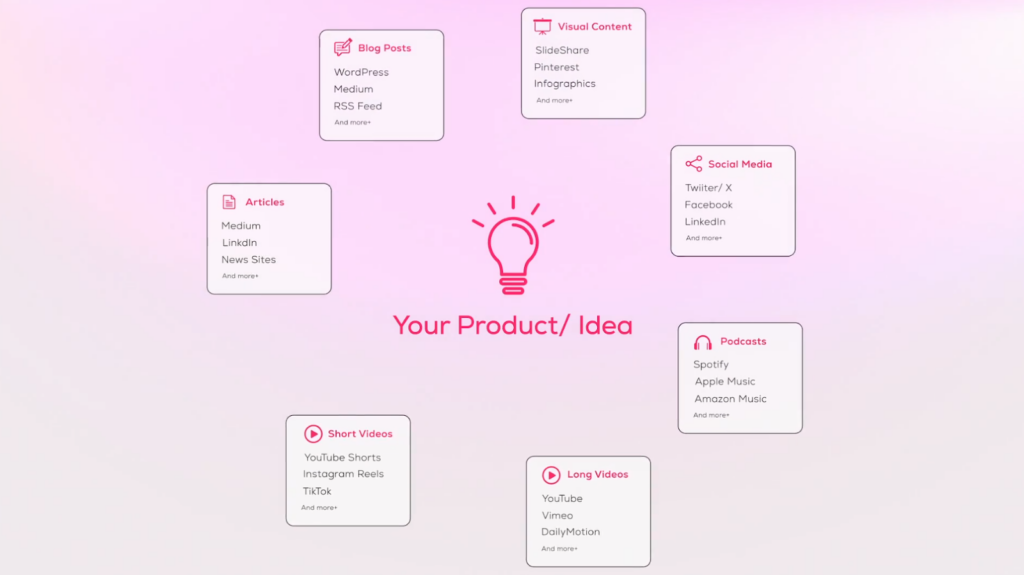
What if you could take your announcement and have it appear everywhere your audience looks, not just Facebook, but YouTube, Google News, Spotify, Pinterest, and hundreds of other platforms, without spending weeks creating content for each one?
That’s precisely what Ampcast AmpiFire’s AI-powered platform does!
It takes a single topic and transforms it into eight different content formats: news articles, blog posts, interview-style podcasts, long-form videos, short-form videos (reels), infographics, slideshows, and social posts.
This content is then automatically published across 300+ high-authority sites (trusted, well-established platforms that search engines and users respect), including Google News, YouTube, Spotify, Pinterest, FOX affiliate sites, and major blog networks.
This multi-channel approach creates something that traditional PR and single-platform strategies cannot match. One AmpiFire customer case study demonstrated the potential of this approach, with campaigns securing multiple page 1 rankings and significant increases in traffic. This case study demonstrates the potential of multi-channel distribution, though individual results will vary based on industry, competition, and campaign execution.
The real power emerges over time. Creating content for each platform manually would require an entire content team.
AmpiFire handles the creation and distribution automatically, making multi-channel marketing accessible without the agency price tag. Each campaign builds on previous ones, creating a compounding effect that strengthens your brand presence and organic traffic month after month.
Ready to Go Beyond Facebook? Try the AmpiFire Method →
Frequently Asked Questions (FAQs)
Should I post the full press release on Facebook?
No. Facebook users expect conversational, scannable content, not formal press release language. Extract the key message, write it in a friendly tone, and link to the full press release for those who want more details. Think of your Facebook post as a teaser that drives interest, not a complete document.
What’s the ideal length for a Facebook press release post?
Keep it between 100 and 250 words. Shorter posts consistently outperform longer ones on Facebook. Focus on the core announcement, the benefit to your audience, and a clear call to action. Anything more detailed belongs in your linked press release or website.
How often should I post press releases on Facebook?
Only when you have genuinely newsworthy announcements, typically a few times per month at most. Posting too frequently with promotional content can cause followers to tune out or unfollow. Mix your press release posts with other valuable content, such as tips, behind-the-scenes looks, and user-generated content.
How does AmpiFire’s distribution compare to posting on Facebook?
Posting on Facebook reaches only a fraction of your followers on a single platform. AmpiFire transforms your announcement into eight content formats and publishes across 300+ platforms, including Google News, YouTube, Spotify, and FOX affiliates. Whether buyers search on Google, browse social media, watch videos, listen to podcasts, or look for visual content, they find you, creating lasting visibility that a single Facebook post simply cannot achieve.